March 2027 Calendar: Printable Layouts and Print Settings
Free printable March 2027 calendar with yearly and monthly layouts, US holidays, Sunday or Monday starts, and print tips for clean, full-page results.
You're lining up school pickups, work meetings, and a stack of printouts when you notice that one calendar puts Monday in the first column and another starts the week on Sunday. A small layout difference shifts every date into a new column, and a printout can lose its outer dates when the paper setting does not match the page.
A March 2027 calendar is easy to get right once you check the grid first, pick a Sunday or Monday week start, and preview the page before printing. You can choose US Letter or A4 and turn federal holiday markings on or off, all without creating an account.
March 2027 Calendar Grid for Sunday and Monday Starts
March 2027 has 31 days. The March 2027 date grid places March 1 on Monday and March 31 on Wednesday in a five-row arrangement for both week starts. The dates stay fixed, but the columns move: a Sunday-start page treats Sunday as column one, while a Monday-start page treats Monday as column one.
Check the rows from left to right
A week row works like seven labeled boxes: change which box is first, and every date shifts position even though none of the dates changed. In a Sunday-start layout, the first cell is Sunday, February 28, followed by March 1 on Monday. In a Monday-start layout, March 1 sits in the first cell.
| Week row | Sunday-start row | Monday-start row |
|---|---|---|
| 1 | Feb 28 (blank), Mar 1–6 | Mar 1–7 |
| 2 | Mar 7–13 | Mar 8–14 |
| 3 | Mar 14–20 | Mar 15–21 |
| 4 | Mar 21–27 | Mar 22–28 |
| 5 | Mar 28–31 | Mar 29–31 |
Blank or gray cells are padding, not missing March dates. Sunday-start can show February 28 at the front and April spillover after March 31; Monday-start starts cleanly on March 1 and leaves more trailing cells after the final Wednesday.
Use the weekday counts as a second check
March has five Mondays, five Tuesdays, and five Wednesdays. Thursday, Friday, Saturday, and Sunday each occur four times. That adds up to 23 Monday-to-Friday weekdays and 8 weekend days.
Grid check: March 1 belongs in the second column of a Sunday-start layout and the first column of a Monday-start layout. In either version, March 31 must land on Wednesday.
Check each layout separately before printing. If March 1 appears under Sunday, the page is still using a Sunday start. Then scan the last row for March 31 under Wednesday, and remember that a plain grid will not flag clock changes or district spring-break dates for you.
Yearly, Monthly and Single-Month Layouts Compared
Picking a calendar layout works like picking a notebook size. A pocket diary suits quick lookups, a desk planner suits daily handwriting, and a single sheet suits one focused job. Dayleaf offers the 2027 calendar in all three forms: a one-page yearly sheet, a set of 12 monthly pages, or an individual month on its own.
| Layout | Pages | Best for |
|---|---|---|
| Yearly calendar | One sheet with all 12 months | Checking dates across all of 2027 |
| Monthly set | 12 separate pages, one per month | Handwritten appointments and school or household notes |
| Single month | One selected month | Printing only the period needed |
The yearly calendar is the overview option. It answers questions that span months, such as which week a trip falls in or how a commitment sits relative to the rest of the year. Its day boxes are small, so treat it as a reference grid rather than a writing surface. Since 12 months share one sheet, run your print check on legibility: confirm in the preview that the day numbers stay readable at that scale.
A monthly set gives each month a full page. The large boxes leave room for appointments, school schedules, and household notes, which makes it the layout for regular handwritten planning. The cost is twelve sheets of paper and a longer print job. Here the preview check shifts to completeness, since a full-size page is more likely to lose an outer row or column if the scale is off.
The single-month layout prints only the month you select. When all you need is March on the wall, it gives you the same month-at-a-glance page as the monthly set without the other eleven sheets.
Whichever layout you pick, the same settings apply: Sunday or Monday as the first day of the week, US Letter or A4 paper, and US federal holiday markings you can turn on, turn off, or skip entirely by choosing the blank calendar. The calendars are free, and you can download a PDF or print without creating an account. The same choices carry over when you build a different month, such as the April 2027 calendar.
Rule of thumb: yearly sheet for scanning across months, monthly pages for handwriting, single month for one quick print.
Paper Sizes and Dimensions to Match Your Printer
US Letter measures 215.9 × 279.4 mm (8.5 × 11 inches), while A4 measures 210 × 297 mm. These paper sizes differ in both their dimensions and their proportions. A calendar formatted for one size can shrink or clip when printed on the other, especially if the printer tries to fit the page without adjusting the scale.
When an edge gets cut off, check the outer date cells first. For March, that means the row containing March 1 and the final row containing March 28–31. If those dates or the calendar border disappear in the preview, the page settings may not match.
US Letter is the usual choice for households, schools, and offices in the United States. A4 is widely used elsewhere, and is also the sensible choice when a print shop or printer tray is set up for A4. Dayleaf offers both paper-size options, so select the size that matches the paper you'll use.
The key is to match the size twice: first on the calendar page, then in the printer dialog. A Letter calendar sent to an A4 tray, or the reverse, can scale unexpectedly or lose part of the grid. Check the tray as well as the software setting if you're printing somewhere other than home.
Set the paper size before adjusting scale. Then choose a horizontal orientation and review the print preview. The ordered print steps below show where to check those settings and what to change if an edge is missing.
US Federal Holidays and Observed Dates in March 2027
A March page covered in colored labels can look busier than the month is. The federal-holiday count tells a simpler story. March 2027 has no US federal holiday observed on a weekday: the Office of Personnel Management's federal holiday schedule lists no March weekday federal holiday for 2027. As a result, all 23 Monday-to-Friday dates in the month are ordinary federal workdays.
That can be easy to misread if a calendar marks cultural or commercial observances alongside federal holidays. St. Patrick's Day is not a US federal holiday, so a federal-holiday layer shouldn't label it as one. The same applies to other dates that change routines without closing offices, such as clock changes or school breaks. A calendar might mark those for personal planning, but they are not federal holidays or federal office closures.
Choose holiday markings for the job
Turn on federal holiday markings when you're coordinating around government schedules, payroll, or observed dates. For a calendar used mainly for personal notes, blank pages may be easier to read if holiday labels would add clutter. Dayleaf's holiday option can be switched on or off, and the blank version removes federal holiday markings.
An observed date is the weekday used for a holiday when the holiday itself falls on a weekend. That's why it's useful to check the official schedule rather than assume the holiday's calendar date is always the day that affects work or service hours. If a specific office, payment, or deadline matters, confirm its schedule directly.
Planning the quarter works the same way. March has no weekday federal closures to account for, and each neighboring month needs its own check against the official schedule rather than an assumption carried over.
Before relying on holiday labels, scan the March dates against the OPM list. The calendar is a planning aid, and the official schedule of the government office or service you need is the final word.
Daylight Saving and Equinox Dates to Mark
A clock change works like a meeting that moves an hour earlier without telling the room: every appointment in your planner still reads the same, but the wall clock disagrees. In the United States, most regions that observe daylight saving time move clocks forward on the second Sunday in March. On the 2027 grid that Sunday falls on March 14, when clocks jump from 2:00 a.m. to 3:00 a.m. and the overnight period runs one hour shorter. A printed calendar can mark the day, but the effect shows up in sleep, morning routines, transport timetables, and the hour attached to a meeting.
That rule stops at the US border. Some countries never change clocks, and countries that do often switch on different weekends. For a remote meeting or an international trip, the question is whether each location involved changes its clocks, and on which date. Check each location's current rule before relying on a time.
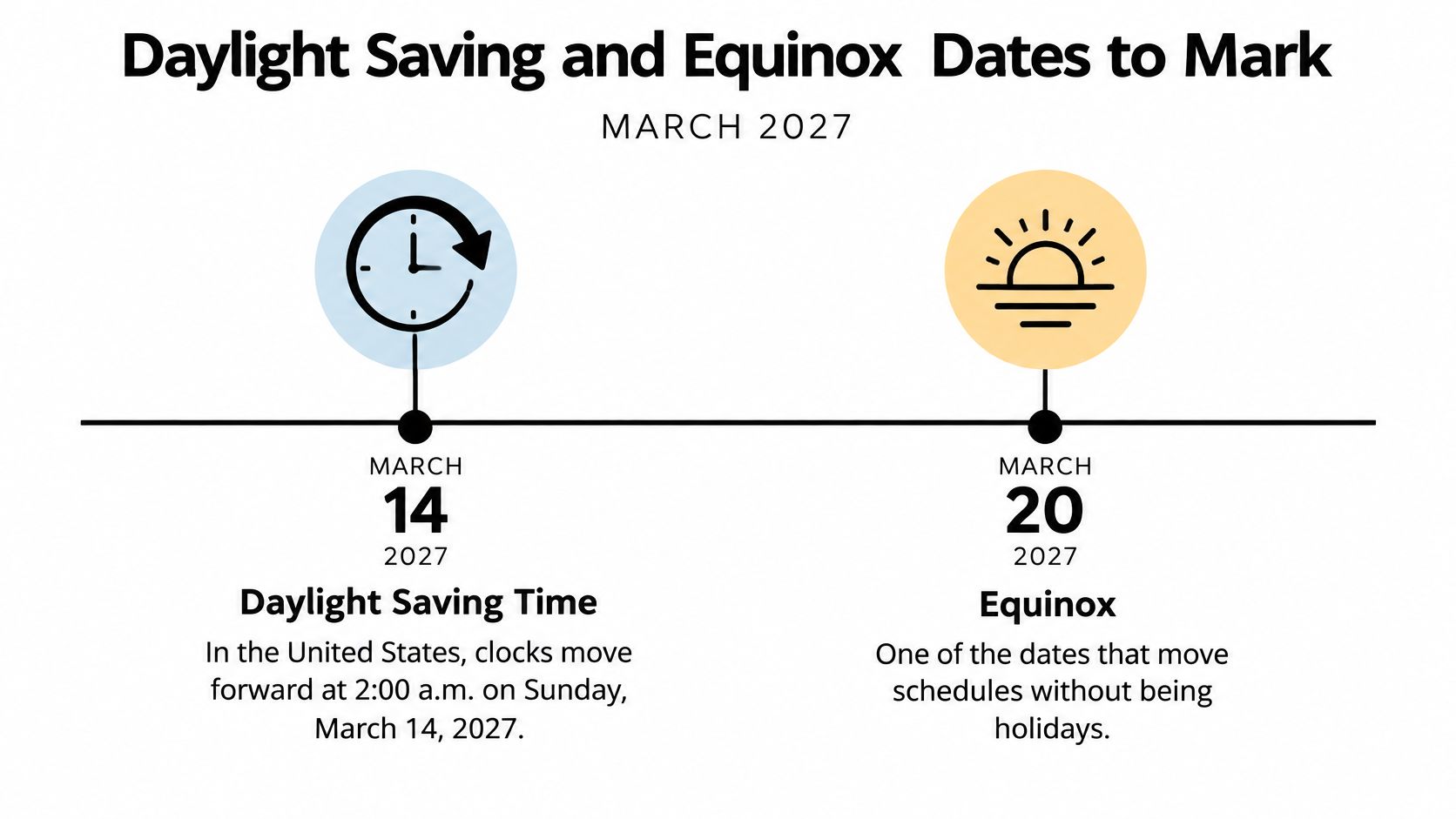
The March equinox is a different kind of date. It is an astronomical event rather than a clock adjustment, so no schedule shifts even though the season does. The March equinox date and local-time information page places the 2027 equinox at 20:24 UTC on March 20, which reads as 1:24 p.m. PDT on March 20 in Los Angeles and 7:24 a.m. AEDT on March 21 in parts of Australia. One instant, two civil dates. In the Northern Hemisphere it opens astronomical spring; in the Southern Hemisphere it opens autumn.
| Date | Event | What changes |
|---|---|---|
| Sunday, March 14 (second Sunday in March) | US clocks move forward from 2:00 a.m. to 3:00 a.m. in participating regions | Night runs one hour shorter |
| Saturday, March 20 | March equinox at 20:24 UTC: March 20 in Los Angeles, March 21 in AEDT | Start of spring in the Northern Hemisphere and autumn in the Southern Hemisphere |
| Sunday, March 28 | Easter Sunday | Many school breaks cluster around this date |
Here's the video for a visual overview of the seasonal and clock-change dates:
Mark the second Sunday in March for any location that observes the clock change, and write the equinox down with its time zone when you coordinate across regions. The equinox can fall on March 19, 20, or 21 depending on the year, so its local date is not fixed everywhere. Before relying on a specific hour for a meeting, a departure, a medication schedule, or a school routine, confirm the local clock rule and the time-zone conversion.
Spring Break Dates Across US Districts
A family in Houston can finish spring break before relatives in New York City have even started theirs. There is no single national spring-break week. The listed 2027 dates run from early March to late April, and the district or school name matters as much as the date itself.
A printed page will not flag these dates for you. The calendar's holiday option marks US federal holidays and observed dates, while each district sets its own break locally. Even with holiday markings turned on, you have to add the break days yourself.
| District | Break dates (2027) | Planning note |
|---|---|---|
| Houston | March 8–12 | Earliest listed break |
| Chicago | On or around March 22–26 | Confirm with the district |
| Los Angeles | On or around March 22–26 | Confirm with the district |
| Miami-Dade | On or around March 22–26 | Confirm with the district |
| Fairfax | On or around March 22–26 | Confirm with the district |
| Philadelphia | On or around March 22–26 | Confirm with the district |
| Palm Beach County | March 29 to April 2 | Starts the day after Easter |
| New York City | April 22–30 | Falls in April, outside March |
The spring-break planning guide for selected US districts places Houston's break on March 8–12, many large districts on or around March 22–26, Palm Beach County's from March 29 to April 2, and New York City's in April. Because Easter falls at the end of March, several listed breaks sit just before or after the holiday.
Treat these as planning dates rather than guarantees. An individual school can shift its days, and a day when students stay home for a teacher workday is different from a published break.
Add a school-planning layer
Write the district or institution next to the dates you mark. Include the confirmed first and last day, any teacher workdays that fall inside the break, and a reminder to check the official local calendar. That detail prevents a common mix-up: two schools in the same area can follow different schedules.
Then work through the practical steps:
- Find the right district or school. A neighboring district may run a different week.
- Mark its listed dates on the March grid. If the break runs into April, carry the final days onto an April page.
- Confirm the official calendar. Check for changes, teacher workdays, and school-specific exceptions.
- Check coverage for the gap. Find out whether camps, childcare, or family schedules line up with the confirmed days.
Families with children in different schools should verify each calendar separately before booking travel or arranging care. The dates above tell you when to check; the district tells you what is closed.
How to Print the Calendar Without Clipped Edges
A calendar can look correct on screen and still print with a missing border or a shortened row. The fix is usually to match the selected layout and paper size to the printer settings, then inspect the preview before printing. Follow the steps in order so you can catch a mismatch before it affects a full set of pages.
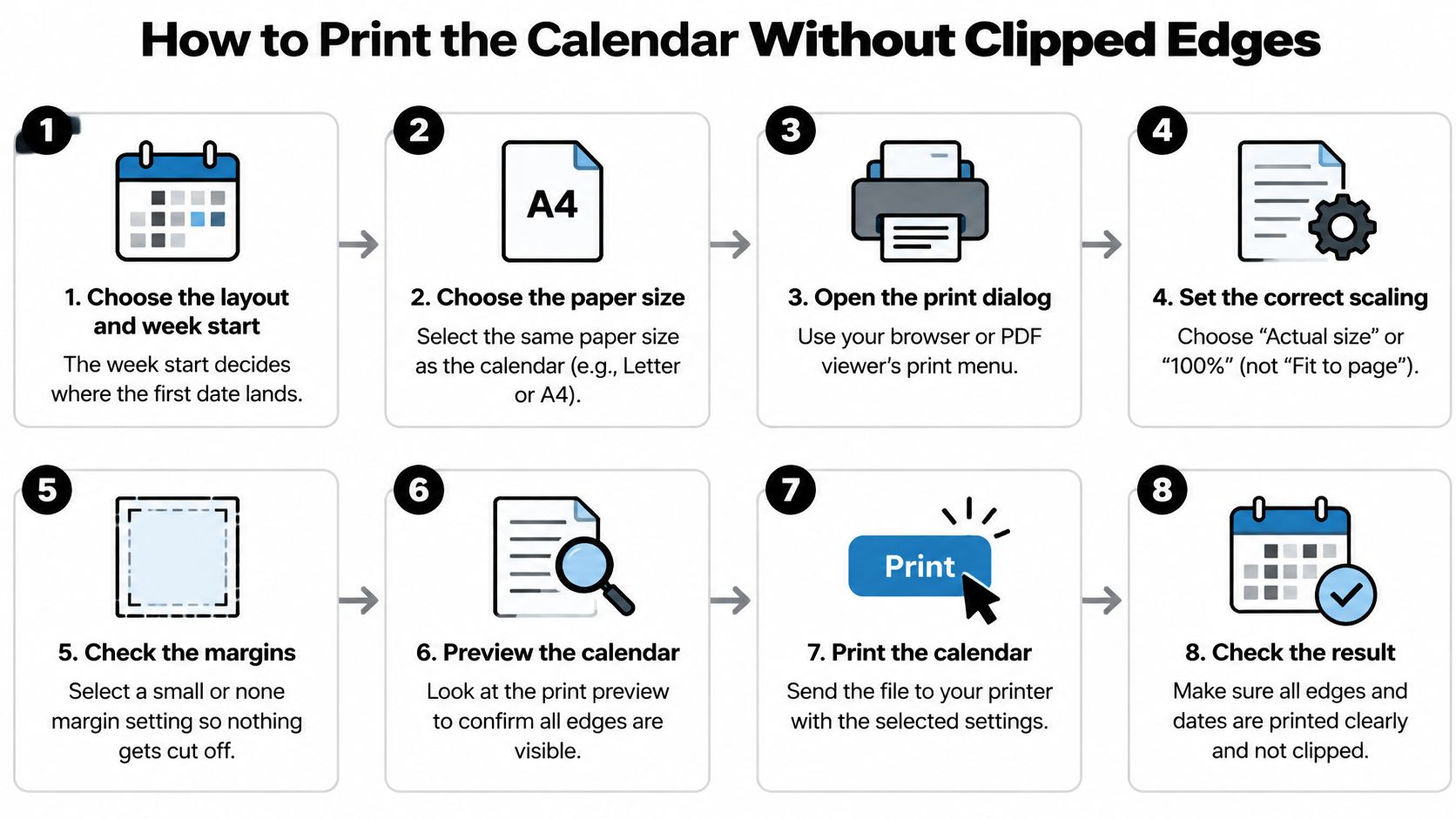
Choose the layout and week start on the calendar page. Select the yearly, monthly, or single-month layout, then choose Sunday or Monday as the first day of the week. The week-start setting determines where March 1 lands, so don't assume the downloaded page uses the convention you normally use.
Choose the paper size. Select Letter or A4 to match the paper you'll load. A frequent slip is choosing the right paper in the calendar settings but leaving a different size selected in the printer dialog.
Download the PDF or open the browser's print option. A saved PDF gives you a file to inspect and print later; browser printing sends the calendar to the print dialog directly. Use the option that fits your workflow, and make sure you've selected the intended calendar before continuing.
Set the orientation to horizontal. The calendar PDF is designed for horizontal printing, which gives the month grid room to spread across the page. If the printer dialog defaults to portrait, the page may shrink to fit or lose space at the edges.
Match the printer's paper setting to the calendar selection. Check the paper-size menu in the print dialog and confirm it matches what you chose on the calendar page. If the tray holds Letter but the dialog says A4, or the reverse, the printer may scale the page or cut off part of it.
Adjust scaling only if the preview shows a problem. If an edge is clipped, choose Fit to page or the equivalent scaling option, then inspect the preview again. Leaving scaling at 100 percent when the printer can't fit the full page may leave a border or date cell outside the printable area.
Print one test page on plain paper. Compare the test with the preview before sending a full monthly set or yearly calendar to the printer. Skipping the test page can turn a small setting error into several unusable pages.
Check the date cells and borders before using the printout. Confirm that the top and bottom rows are intact and that the grid hasn't shifted. A correct printout shows all 31 dates, has no cut borders, and leaves the March 14 row readable.
If the test page doesn't match the preview, return to the paper size, orientation, and scaling settings before printing again. A small adjustment is easier than rewriting plans on a calendar with a missing edge.
Verify Key Dates Before You Rely on the Printout
A printed calendar is a useful planning aid, but it won't update if a school, clinic, or government office changes a date. Calendars may also contain errors, so confirm consequential dates with an authoritative source before you rely on them.
Use this quick check after printing:
- Check the week start. March 1 should sit in the first column of a Monday-start grid and the second column of a Sunday-start grid.
- Check federal dates if they matter to your plans. Compare holiday markings with the official OPM holiday list.
- Check the event that controls your plans. Confirm school breaks with the school or district calendar, travel with the airline or transit schedule, and clock changes with the local time-zone rule.
If a March 2027 date determines a flight, medical appointment, or school enrolment, verify it with the official source before committing. Dayleaf calendars are free to use, but they're provided for general planning and shouldn't replace authoritative confirmation. If you find an error in a calendar, send a report to the Dayleaf team at support@printable-calendar-free.com.
Choose a yearly overview, a set of monthly pages, or a single month with Dayleaf's free printable calendars, then set your week start and paper size before downloading or printing. Visit Dayleaf to prepare a March 2027 calendar that fits your plans and printer.