Calendar for April 2026: Printable Layouts and Print Tips
Your calendar for April 2026 with the date grid, printable layouts, print settings and observance dates to check first.
You can print a perfect date grid and still book the wrong week. A calendar for April looks finished once the boxes line up, yet two people can read the same month as different weeks, and a date-only sheet can hide whether a day is a public closure, a religious observance, or only a civic note.
April 2026 is a sharp test of that habit. The month has 30 days and opens on Wednesday, 1 April. That single weekday changes the first row, where the weekend sits, and which numbered week a deadline falls in. Observances that begin at sunset, or public holidays that apply in one country and not another, can still send someone to school or work on the wrong day.
Treat the sheet as a set of labelled decisions. Pick one week start and keep it. Label each observance by type, region, and timing. Check the print against the screen before you pin it up.
April 2026 Week Grid at a Glance
| ISO week | Mon | Tue | Wed | Thu | Fri | Sat | Sun |
|---|---|---|---|---|---|---|---|
| Week 14 | 30 Mar | 31 Mar | 1 Apr | 2 Apr | 3 Apr | 4 Apr | 5 Apr |
| Week 15 | 6 Apr | 7 Apr | 8 Apr | 9 Apr | 10 Apr | 11 Apr | 12 Apr |
| Week 16 | 13 Apr | 14 Apr | 15 Apr | 16 Apr | 17 Apr | 18 Apr | 19 Apr |
| Week 17 | 20 Apr | 21 Apr | 22 Apr | 23 Apr | 24 Apr | 25 Apr | 26 Apr |
| Week 18 | 27 Apr | 28 Apr | 29 Apr | 30 Apr | 1 May | 2 May | 3 May |
April 2026 holds 30 days and begins on Wednesday, 1 April. On a Monday-first grid the opening row is partial. It runs from Monday 30 March through Sunday 5 April. Each later row covers seven consecutive days. ISO week 18 then runs from Monday 27 April through Sunday 3 May, so May spills onto the sheet.
A Sunday-first printout does not change any April date. It only moves the columns. Sunday sits first, and each row starts one day earlier: 29 March, then 5, 12, 19, and 26 April. That closing row ends on Saturday 2 May, not Sunday 3 May. Check which convention a printout uses before you count days. A shared household should pick one start day and keep it, including on a simple April 1 calendar for the opening week.
The first column shows ISO weeks 14 to 18. Many schools and workplaces number weeks from Monday, so those are the numbers a work system will quote.
Three counts are worth marking before you write plans into the boxes:
- Days in the month: 30 numbered dates, from 1 April through 30 April.
- Weekdays: 22 days from Monday to Friday.
- Weekend days: eight, Saturdays 4, 11, 18, and 25 April, and Sundays 5, 12, 19, and 26 April.
Three-part check: Find the target date, confirm its weekday in the matching row, and only then copy it into a planner.
That order stops the slip of writing "Monday the 6th" when Sunday 5 April and Monday 6 April sit on opposite sides of the week boundary.
Why April Has 30 Days and Where Its Name Comes From
Count the boxes before you trust the artwork. April is the fourth month of the modern Gregorian calendar and contains 30 days, which the account of Aprilis ties to the calendar used internationally today. A sheet with 29 or 31 numbered boxes is the wrong length.
That count was built, not inherited. The earliest known Roman calendar began in March, so Aprilis was the second month of a 10-month year. January and February were added later, a shift generally associated with reforms attributed to Numa Pompilius around 700 BC. By approximately 450 BC, April stood fourth and had 29 days. Julius Caesar's reform in the mid-40s BC created the Julian calendar and restored 30 days. The revision associated with Augustus in 8 BC left that length in place.
The name is still unsettled. One theory links Aprilis to aperire, Latin for "to open," possibly for spring buds. Another links it to Aphrodite and Venus. Both stay theories. The 30 boxes are what that long standardization left you to check first.
Choosing Between Sunday and Monday Week Starts
A grid can look right and still be read two ways. Sunday-first layouts park Saturday and Sunday at the edges of each row. Monday-first layouts group the weekend at the end, and ISO week numbers follow the Monday convention. A school sheet that starts on Sunday and a workplace that quotes ISO weeks can disagree about which week a date belongs to.
April 2026 makes the boundary obvious. 5 April is a Sunday and 6 April is a Monday. A parent who counts Sunday as the start of the week may treat the days around 5 April as one week. A colleague using ISO weeks puts Sunday 5 April at the end of week 14 and Monday 6 April at the start of week 15. A student who reads a weekend deadline off the school sheet can miss a Monday hand-in that the work calendar already filed under the next week.
Calendarific's April 2026 month page shows why a longer holiday list doesn't fix that mismatch. The same month can include Qingming in China, Songkran in Thailand, Tiradentes Day in Brazil, Anzac Day in Australia and New Zealand, and Golden Week beginning in Japan, plus both Western and Orthodox Easter. Pages that only answer which dates fall in April skip the harder questions. Which week-numbering convention applies? Does this entry close offices in your country? How does a family line up school breaks with religious absences? Without region and type labels, extra names add ambiguity.
Use the week start your main calendar already uses, usually work or school, because that is the page other people will check. If a household mixes systems, print one convention and write the ISO week numbers on it. A blank calendar starting on Monday keeps the work week in one block when that is the convention you chose.
More holiday names don't make a shared month clearer. One week start, plus labels, does.
Choosing a Printable April Layout
| Layout | Writing space | Best for | Trade-off |
|---|---|---|---|
| Single monthly page | Large, one month per sheet | Daily appointments and handwritten notes | Must turn pages to see other months |
| Yearly sheet with April row | Small boxes for each date | Checking dates across the year | Little room for notes |
| Weekly planner pages | Medium, one row per day | School runs, household tasks, shift work | Pages multiply quickly |
| Monthly page with notes column | Large grid plus side margin | Shared family or team planning | Narrower date boxes |
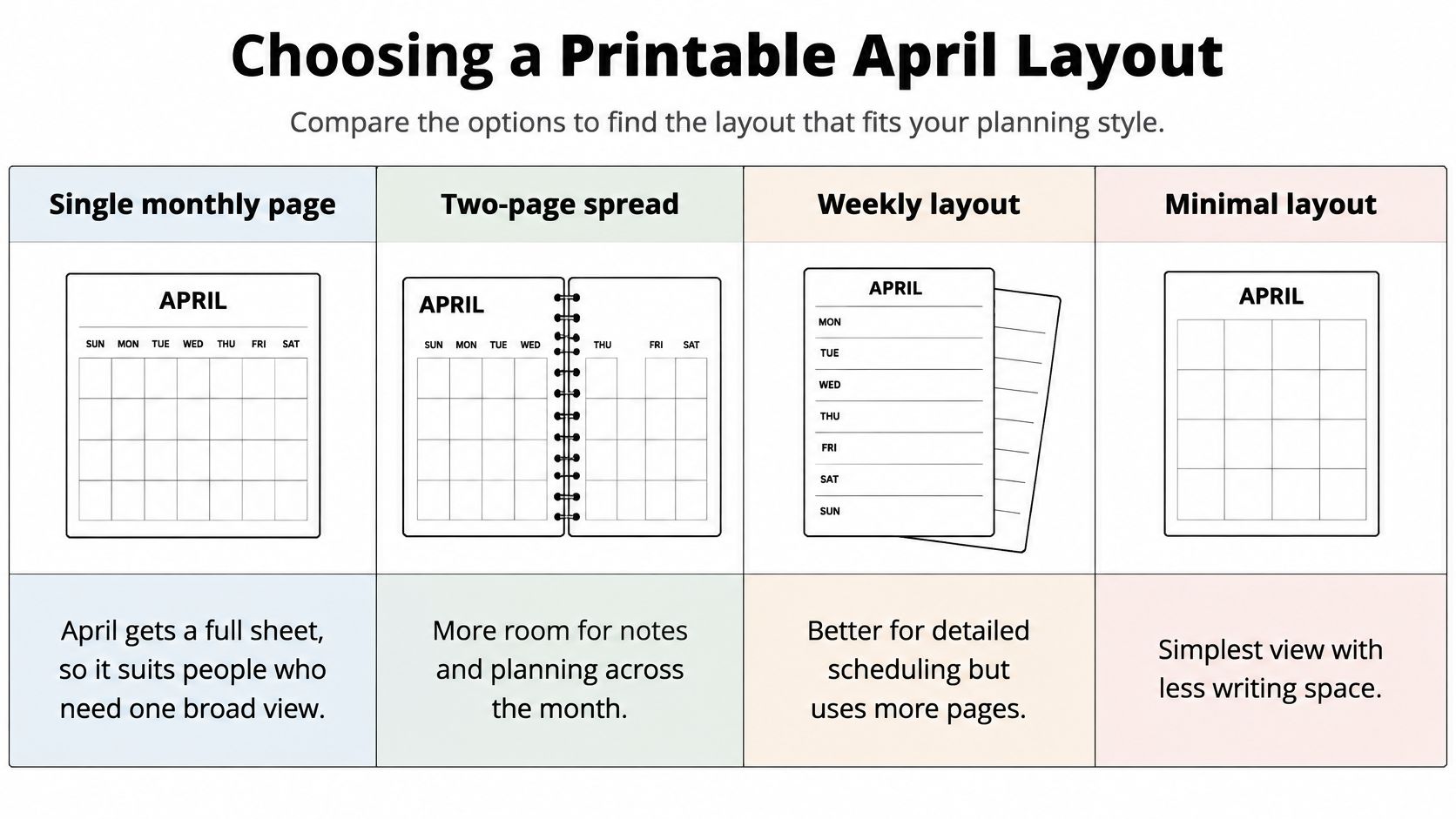
Count how many entries a typical day holds, and decide whether other people will read the sheet. Those two answers pick the page.
Who each layout is for
A single monthly page gives April a full sheet. It suits daily appointments and handwritten notes. You turn a page to see May, so it is a weak choice if you constantly compare months.
A yearly sheet puts all twelve months in view. Each April box is small, so it works for dates and short marks, not paragraphs. Reach for it when the question is "which week in which month," not "what time is pickup."
Weekly planner pages give each day its own row. Say a parent tracks three school runs, a piano slot, and a rotating shift. A row per day holds that list. Across a 30-day month the stack of pages grows fast, so this layout is a poor fridge poster.
A monthly page with a notes column keeps the month visible and adds a side margin for tasks. Shared family or team planning fits there. The date boxes get narrower, so tiny handwriting becomes the main limit.
A quick way to choose
If a normal day has one or two marks and only you read them, the single monthly page is enough. If several people add chores, print the notes-column page and agree who writes in the margin. If the day is a sequence of times, use weekly rows. If you are only checking whether a date exists in another month, stay on the yearly sheet.
All four are designed for wide orientation. Portrait will squeeze the grid no matter which layout you picked.
If you want to see how a month grid is read aloud before you print, this short walkthrough covers the same kind of page:
How to Print April Without Cut-Off Edges
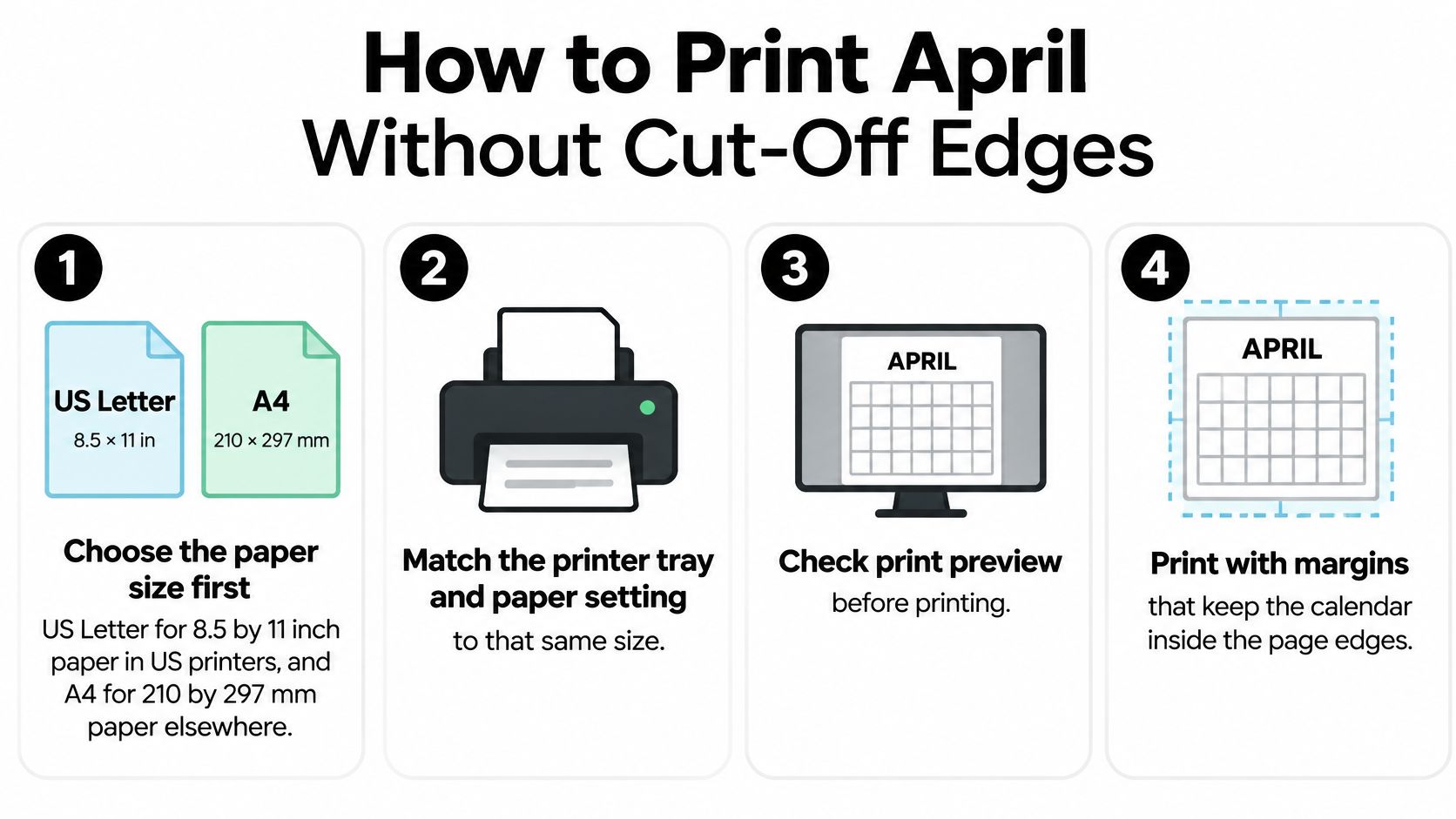
Work through the print settings in this order. Each step prevents a different kind of clipped page.
- Choose the paper size first. US Letter is 8.5 by 11 inches for many printers in the United States. A4 is 210 by 297 mm elsewhere. The calendar page lets you select either size before you download.
- Match the tray and the paper setting to that same size. Before printing, the paper size in the printer settings should match the size selected on the calendar page. A mismatch scales the page and clips the edges.
- Set orientation to horizontal. These PDFs are designed for horizontal printing. Portrait compresses the week columns until the weekend dates fall off the side.
- Open print preview. Confirm that the date boxes, any holiday labels, and the bottom row sit inside the margins. Don't send a stack to the printer until that frame looks complete.
- If an edge is cut off, turn on the printer's fit-to-page setting rather than editing the file, and check the preview again. A 100 percent scale can clip the bottom row when the margins are narrow.
- Print one test page on plain paper and hold it against the screen. Confirm the dates and the week start. A test page saves heavier stock.
- Only then print the full set. Use card or heavier paper if the calendar will be pinned up.
A correct printout lines the first row up with the week start you chose, ends on date 30, and cuts off no date or label.
If the test page fails, change the printer setting. Don't redraw the grid.
Holidays and Observances in April 2026
| Observance | Where observed | April 2026 timing | Entry type |
|---|---|---|---|
| Passover | Jewish communities worldwide | Begins at sunset April 1 or runs April 2 to 9, depending on calendar | Religious observance, sunset start |
| Western Easter | Western Christian churches | April 5 | Religious observance |
| Orthodox Easter | Eastern Orthodox churches | April 12 | Religious observance |
| Qingming | China | Early April, date varies | Public holiday, country-specific |
| Songkran | Thailand | April 13 to 15 | Public holiday, country-specific |
| Vaisakhi | Sikh and Punjabi communities | Mid-April, usually April 13 or 14 | Religious observance, date varies |
| Baháʼí Ridván | Baháʼí communities | Begins at sunset April 21 | Religious holiday, sunset start |
| Tiradentes Day | Brazil | April 21 | National public holiday, country-specific |
| Anzac Day | Australia and New Zealand | April 25 (Saturday) | National commemoration, country-specific |
| Golden Week | Japan | Begins April 29 | Multi-day holiday period, country-specific |
A calendar for April is often treated as a civil date grid. People planning across cultures need a split between civil dates, observances, and events that begin or end at sunset.
Three labels on every entry
- Type: public holiday, religious observance, or cultural date. A religious date isn't automatically a day off work.
- Region: the country or community it applies to. One nation's list isn't a world list.
- Timing: a fixed civil date, a date that shifts by tradition, or a start at sunset.
The City of Vienna intercultural calendar for April shows why timing has to be written down. In April 2026, Passover runs from 2 to 9 April in one institutional calendar, while another specifies that it begins at sunset on 1 April. Baháʼí Ridván begins at sunset on 21 April and continues into May. Buddhist, Sikh, Hindu, Jewish, Christian, and other observances also overlap that month, including Songkran, Vaisakhi, Easter, and Orthodox Easter. A date-only grid can cause scheduling errors even when the printed numbers look correct. That gap hits multinational households, schools, employers, and international teams.
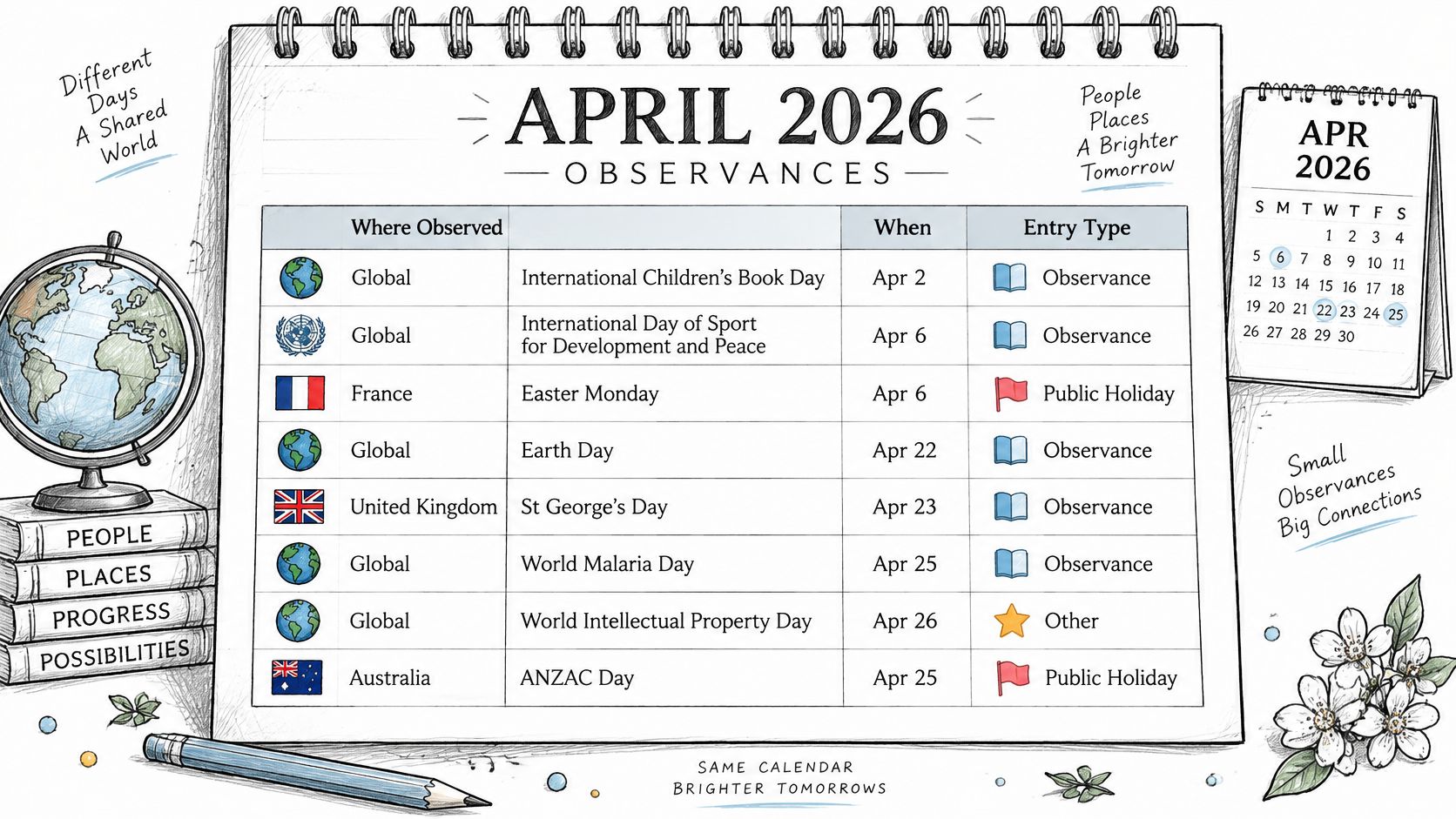
Songkran, Vaisakhi, Anzac Day, and Golden Week matter to specific readers. They aren't a universal closure list. Mark them country-specific or community-specific so a colleague elsewhere doesn't treat them as an office holiday. Check which calendar a school or employer uses before you block the day. Two references can place the same observance on neighboring dates.
Calendars are for general planning and may contain errors, so check an authoritative source before you rely on a date. Questions, feedback, or reports of errors can go to the Dayleaf team at support@printable-calendar-free.com.
Counting Working Days in April
In the United States, April 2026 contains 22 workdays, according to Calendarr's printable April 2026 calendar. Take the 30 days in the month and remove the eight Saturdays and Sundays. Those 22 Monday-to-Friday dates remain.
Holidays change the count only for the reader they apply to. Songkran falls on 13 to 15 April, which this grid shows as Monday, Tuesday, and Wednesday. A worker in Thailand who observes all three days takes those three weekdays off the U.S. count of 22. Anzac Day falls on Saturday 25 April, so it doesn't reduce the weekday count. Readers who assume every named holiday costs a working day get that Saturday wrong.
A sunset-start observance adds a different wrinkle. The evening before the printed date may already be treated as the start of the day, even though the civil date on the grid hasn't rolled over. Ask whether the absence begins at sunset or on the morning of the printed date.
Use this order:
- List the weekday dates that apply to your own schedule.
- Remove only holidays that fall on weekdays and that apply to you.
- Write that result in the planner next to the month, with the country named.
The count depends on the employer and the country. Confirm it with the employer or the local authority before you set deadlines.
Related Calendars and Where to Check Dates
Neighboring months are where a single April sheet goes wrong. On a Monday-first page, Tuesday 31 March sits in the same opening row as the first days of April. A Sunday-first April page reaches back to 29 March. If the March sheet and the April sheet use different week starts, that shared row won't line up when you put them side by side.
May opens on Friday 1 May. One week start stops April's last row inside that week. The other carries the row through 3 May. A combined April, May, and June calendar shows those boundary weeks without flipping single months.
A one-page yearly view is the reference when the question is which month a date sits in. The April monthly sheet is the reference when the question is what you will write on that day. School term calendars, workplace shift rotas, and the closure lists public bodies publish sit beside both. They answer different questions, so they shouldn't be merged into one unlabeled column.
When two calendars disagree, decide which one governs the decision.
- School events: the school term calendar governs dates, trips, and closures.
- Leave and shifts: the employer's rota governs, even if a public list looks fuller.
- Public closures: the authority that publishes the closure list governs offices and services.
Name the calendar you will check first for each task. The April sheet is one part of that set, not the only source.
Final Check Before Printing
Run this list once, in order, before you write deadlines on the page.
- Confirm the year. April 2026 starts on Wednesday 1 April. If 1 April falls on another weekday, the sheet is for a different year.
- Pick the layout from the comparison you already made. A monthly page holds detailed notes. A yearly sheet is for checking dates across the year.
- Match the week start to the work or school calendar. If the household mixes conventions, write the ISO week numbers on the page.
- Decide on holiday labels. Tag any observance you add with region and timing. Leave personal dates unmarked when a holiday layer would only add noise.
- Run one test page with the paper size, horizontal orientation, preview, and fit-to-page choice already set.
- Verify each observance against an authoritative source before you rely on it.
Write deadlines onto the sheet only after the year, the week start, and that source check are done. The calendars are free to use. US federal holiday markings can be turned on or off, and a blank calendar without holiday markings is available. The 2027 calendar is available as a one-page yearly calendar showing all 12 months on one sheet, or as a set of monthly pages with a separate page for each month.
Dayleaf makes free printable calendars for everyday planning, including an April sheet you can set to a Sunday or Monday week start and to US Letter or A4. Choose a monthly page when you need writing room, or a one-page year when you only need to check dates, then download a PDF or print from the browser. Visit Dayleaf to build the April layout that matches the calendar you actually plan from.