Blank Calendar Starting on Monday: Free Printable Layouts
Find a blank calendar starting on Monday with yearly and monthly layouts, US Letter or A4 sizes, and ISO week notes, ready to print for 2027.
If a calendar puts Monday in the first column, does that make it compatible with the week numbers your school, payroll system, or overseas team uses? Often it doesn't. Column order is only the visible part. A useful blank calendar starting on Monday also needs complete Monday to Sunday rows, and, when you count weeks, correct treatment of dates that cross from one year into another.
That distinction matters most in late December and early January, when the month name and the week-year label can disagree. You'll make better printing choices once you separate three decisions: layout, start day, and whether to show ISO week numbers.
Blank Monday-Start Calendar Layouts Compared
Start with writing space, not appearance. A yearly sheet helps you spot patterns, but its small boxes can't hold much handwriting. Monthly pages reverse that trade-off, while a single month suits a short, defined period.
| Layout | What You Get | Best For | Writing Space |
|---|---|---|---|
| Yearly one-page | All 12 months of 2027 on one sheet | Checking dates across the whole year | Small day boxes, little room for notes |
| Monthly set | 12 separate pages, one per month | Appointments, school dates and household schedules | Full page per month, more room for notes |
| Single month | One page for the chosen month | A short period such as a trip or term block | Same room as a monthly page |
Yearly One-Page Layout
Pin the yearly version where you need fast reference, such as beside a desk or inside a kitchen cupboard door. You can compare a school break in March with a family trip in July without flipping pages. Don't rely on it for appointment times, addresses, or task lists, because crowding several notes into one small box makes the page hard to read.
Use short marks instead. A dot, initial, or coloured underline can flag a date, with details kept on the matching monthly page.
Monthly Set and Single Month
The monthly set gives each date enough room for ordinary handwriting. Say you're coordinating medical appointments, assignment deadlines, and shared household tasks. One page per month lets you record the time and a brief note without shrinking your writing.
A single-month page works the same way for a narrower job. Print one for a trip month, exam block, renovation schedule, or the first month of a new routine. It's also the sensible test format before you commit paper to a full year.
Practical rule: Pick yearly for seeing, monthly for writing, and single month for testing or short projects.
Every layout should share the same underlying structure. According to the ISO 8601 overview on Wikipedia, ISO 8601 identifies Monday as weekday 1 and Sunday as weekday 7, so columns run Monday through Sunday and each row forms one complete week. Days borrowed from neighbouring months can complete the first and last rows, but they should look visually different from dates in the selected month.
That detail prevents a common copying error. If greyed dates from the previous month look identical to current dates, you may write an appointment in the wrong week while scanning quickly.
Dayleaf's 2027 calendar is free to use and offers yearly and monthly formats, with week start, paper size, and either US federal holiday markings or a blank version chosen in one place through the printable calendar tool. Choose the format that matches your purpose, print one test page, check the first column and edges, and only then print the full set.
Why Monday Comes First in ISO-Based Calendars
Monday comes first because the international date standard numbers the week that way. The Oracle ISO calendar hierarchy guide describes ISO week notation with Monday as day 1 and Sunday as day 7, creating one consistent order across countries, businesses, schools, and digital systems.
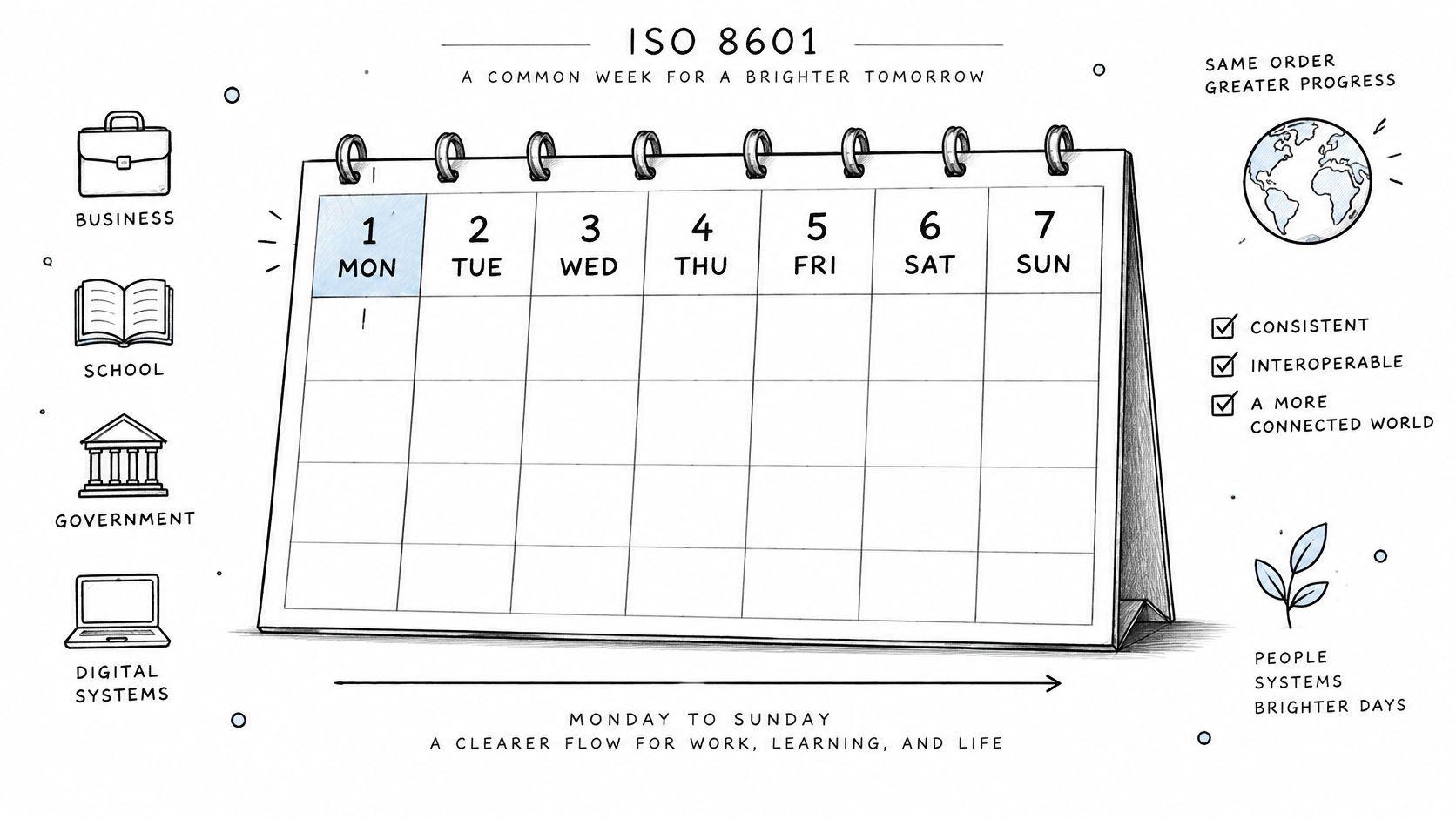
The order also fits ordinary working life. Monday through Friday sit together, followed by Saturday and Sunday at the end of the same row. You don't split one weekend across two rows or mentally join Sunday at the left edge to Saturday at the right edge.
That consistency supports practical systems:
- Payroll periods: A pay week can open Monday and close Sunday on one printed row.
- Shipping schedules: Dispatch days follow the same left to right order as the operating week.
- School timetables: Lessons read from Monday toward Friday, with weekend activities after them.
- Recurring tasks: A weekly accounting close or household routine stays in one uninterrupted sequence.
A blank page doesn't perform those calculations for you. Its advantage is simpler. The printed order matches the order used by many administrative systems, while every box remains empty for your own appointments and notes.
Monday-first printing is a layout convention on paper, but it reflects an international numbering system behind the scenes.
Choosing Sunday or Monday Start by Region and Use
A start day works like the binding on a notebook: the dates remain the same, but it determines which days stay together. If a timesheet treats Monday through Sunday as one block, a Sunday-first page separates that block visually and can change how a deadline or shift is read.
Sunday-first and Monday-first conventions have different regional and institutional roots, so copy the systems you coordinate with. Many North American household calendars and software views begin on Sunday. ISO-based layouts and work schedules that group labor from Monday through Sunday often begin on Monday. The calendar setting lets you choose either day as the first column before downloading.
Check the convention where your dates originate:
- Employer timesheets: Match the first day used for hours, overtime, and shift blocks.
- School calendars: Match the timetable you copy dates from. To test one school month, compare its first column with an individual monthly calendar page before printing the full set.
- Shared planners: Agree on one convention for the household or team, then print every copy from that setting.
- Reporting tools: Follow the system that names the reporting week rather than your printer's default.
Week labels need extra care around December and January. Under ISO week numbering, a date near the end of one calendar year can belong to the first week of the next, while an early January date can remain in the previous week-year. A Monday column order alone does not resolve those boundary dates, so a page used for week-numbered planning should show the applicable week labels.
Mixing conventions causes the clearest mistakes. Say a timesheet begins Monday but your wall calendar begins Sunday. A Saturday shift can look attached to the following row, and a Sunday deadline can be copied into the wrong week. The dates have not changed; their grouping has.
For personal planning, either convention can work. Confirm the start day with whoever shares the schedule, then keep it consistent across every printed copy.
How to Print a Blank Monday-Start Calendar
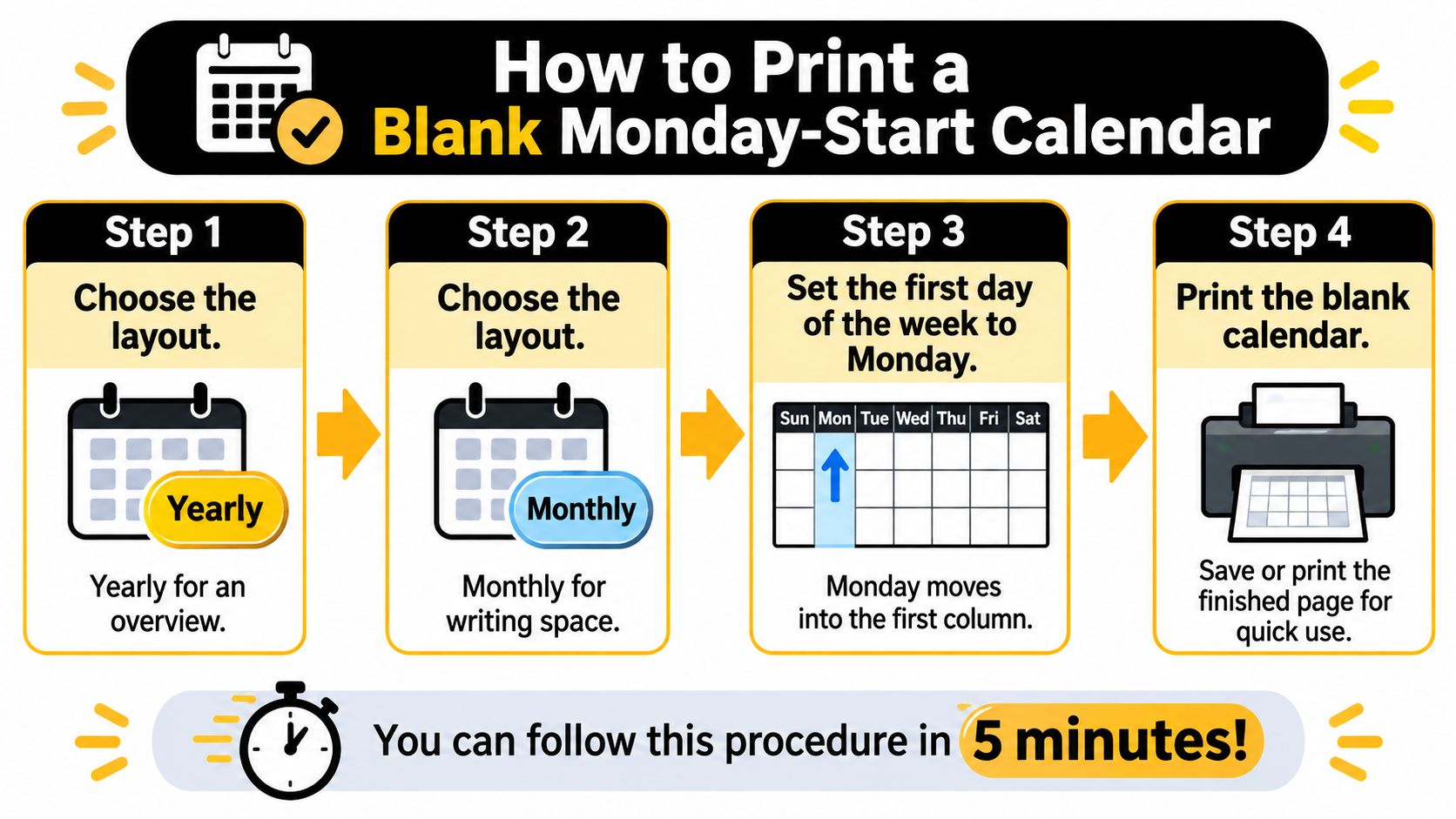
You can produce a correct test page in about five minutes if you set the calendar before opening the printer dialog. Work in this order, because changing paper size or start day after downloading usually means starting again.
The visual summary below condenses the process into the layout, start day, and print decisions.
Set the Calendar First
- Choose the layout: Pick yearly for an overview or monthly for writing space. For a first check, download one monthly page rather than the full set.
- Set Monday as first day: Confirm Monday appears in the left column. If Sunday is first, every date shifts one column compared with an ISO style schedule.
- Select paper size: Use US Letter in the United States and Canada, or A4 in most other countries. Match the selection to the paper loaded in the tray.
- Choose holiday visibility: Select the blank version if you don't want markings. Turn federal holidays on only when those dates help your planning.
- Download or open print: Save the PDF if you may reprint it, or print directly from the browser for a one-off page.
Check the Printer Dialog
- Open print preview: Confirm the page is horizontal and all seven columns are visible. Don't skip this check, because a clipped Sunday column may not be obvious in a small browser view.
- Match printer paper size: Before printing, the paper size in your printer settings should match the size selected on the calendar page. A Letter file sent to an A4 setting, or the reverse, can shrink or clip the grid.
- Set scaling: Use 100 percent when the preview fits cleanly. Use fit to page when the printer would otherwise cut off the edges.
The short video below gives you a visual pass through the printing stage before you commit to multiple pages.
Print one page on ordinary paper first. A correct result shows Monday through Sunday across the top, complete weekly rows, readable date numbers, and no missing border at either side.
Read the first column header on the printed sheet before writing anything. That one check catches the most disruptive error while it's still cheap to fix.
Common Print Problems and Their Fixes
Most faults come from a setting left at its default, not from the dates themselves. Diagnose the printed symptom, correct the source setting, and download again instead of trying to repair a paper copy by hand.
- The week starts on Sunday: The week-start setting was left unchanged. Reset the first day to Monday, download a fresh file, and discard the old test page so the household doesn't use two versions.
- Unwanted holidays appear: Holiday markings were left on. Select the blank version and print again. Crossing markings out leaves clutter in boxes you wanted for handwriting.
- Edges are cut off: The document and printer scaling don't fit the printable area. If the edges of a printed calendar are cut off, use the printer's fit-to-page setting and check the print preview before reprinting.
- Week numbers don't match the month label: The page is showing ISO week-year labels around late December or early January. Read the week-year label for those boundary days rather than assuming January always begins week 1.
- A date disagrees with another source: Calendars can contain errors. Confirm critical dates against an authoritative source before relying on them for travel, work, or school commitments.
Finish with a side-by-side test. Print one plain page, hold it against the screen preview, and check the first column, the far-right Sunday column, and all four edges. Print the full set only after those match.
Year-Boundary Dates for 2026 and 2027
Does the first day of January always open week 1? Under ISO 8601, no. The week-year is assigned to whole Monday to Sunday rows, so a date can sit in January while its row still belongs to the previous ISO week-year.
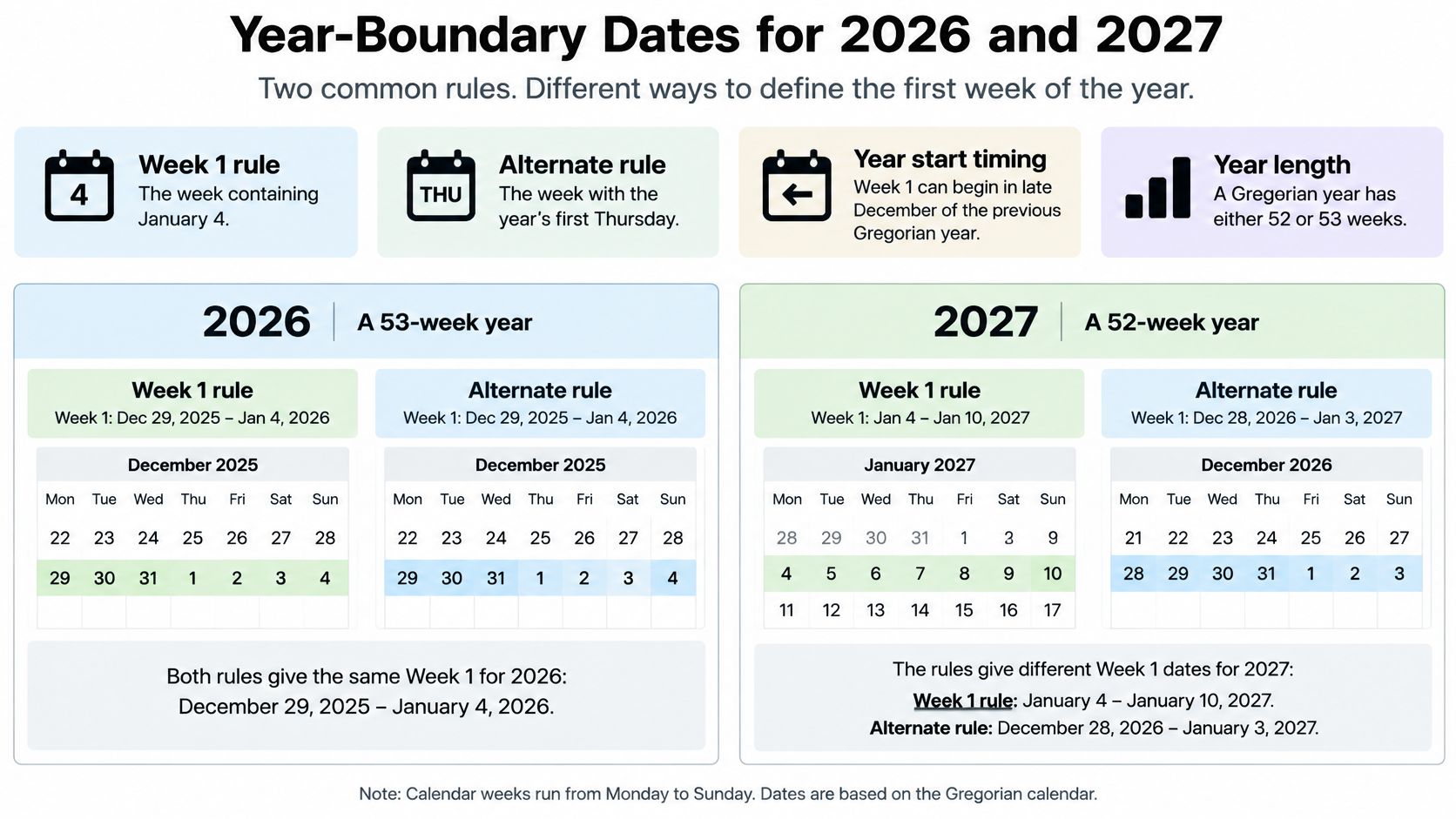
Week 1 is the week containing January 4, equivalently the week containing the year's first Thursday; the AlarmClick guide to ISO week numbers explains that ISO 8601 makes Monday day one and Sunday day seven, while dates at either side of New Year can belong to the neighbouring ISO week-year.
A Gregorian year can produce a 53-week ISO year instead of the usual 52. When that happens, the extra week pushes across the boundary and the first January rows still wear the old week's label. In the next year the opposite can occur: the final December row ends cleanly, and the first days of the following January remain attached to that last row until a new Monday begins week 1.
The entries below show the labels those boundary rows would carry.
| Date | ISO Week Label |
|---|---|
| Monday, December 28, 2026 | Week 53 of 2026 |
| Friday, January 1, 2027 | Week 53 of 2026 |
| Monday, January 4, 2027 | Week 1 of 2027 |
| Monday, December 27, 2027 | Week 52 of 2027 |
| Friday, December 31, 2027 | Week 52 of 2027 |
| Sunday, January 2, 2028 | Week 52 of 2027 |
| Monday, January 3, 2028 | Week 1 of 2028 |
Read the table as row ownership, not as a mistake in the month heading. A Friday box can show January while the row label still points to the earlier ISO week-year, because the week is anchored to the Monday that opened that row. The month heading answers which Gregorian month contains the date. The ISO label answers which week-year owns the complete seven-day row.
A Monday-start page only rearranges columns. An ISO week-numbered page must also assign those complete rows to the correct week-year.
When a Blank Calendar Needs ISO Week Numbers
Add week numbers when your planning language counts weeks. If colleagues say "deliver in week 37," a date-only grid forces you to calculate the row every time. If you write "dentist, Tuesday at 10," week numbers add labels you don't need.
Week numbers are useful for:
- Payroll periods: Matching printed rows to numbered pay weeks.
- Shift work: Checking rotations that repeat by week number.
- School planning: Referring to teaching weeks across a term.
- Reporting: Comparing activity in the same numbered week across periods.
Use a direct decision rule. If your reporting refers to week numbers, print the ISO layer. If you only record dates, skip it and keep the boxes cleaner.
Say a shift planner announces that a rotation begins in week 1 of 2027. That rotation starts Monday, January 4, 2027, not on January 1. New Year's Day still belongs to week 53 of 2026, so placing the rotation on January 1 would start it three days early.
Any optional week-number layer should be clearly labelled ISO week-numbered, with a short note explaining the Thursday rule. Don't assume that Monday in the first column guarantees week numbers are present or calculated by ISO rules.
North American organisations may use Sunday-start calendars and different numbering practices. Confirm your organisation's system before printing a year, because a minimally labelled page can become harder, not easier, to share across regions.
US Federal Holidays and Observed Dates for 2027
Holiday markings answer two separate questions: the date the federal rule fixes, and the date offices close. For most holidays those are the same day. When a fixed-date holiday lands on a weekend, they split, with a Saturday holiday observed the Friday before and a Sunday holiday observed the Monday after. To see how markings look on a month that has no federal holiday at all, compare a blank month against a marked page such as the April 2027 calendar.
| Holiday | Federal Rule | 2027 Date | Observed Date |
|---|---|---|---|
| New Year's Day | January 1 | Friday, January 1 | Friday, January 1 |
| Martin Luther King Jr. Day | Third Monday in January | Monday, January 18 | Monday, January 18 |
| Washington's Birthday | Third Monday in February | Monday, February 15 | Monday, February 15 |
| Memorial Day | Last Monday in May | Monday, May 31 | Monday, May 31 |
| Juneteenth | June 19 | Saturday, June 19 | Friday, June 18 |
| Independence Day | July 4 | Sunday, July 4 | Monday, July 5 |
| Labor Day | First Monday in September | Monday, September 6 | Monday, September 6 |
| Columbus Day | Second Monday in October | Monday, October 11 | Monday, October 11 |
| Veterans Day | November 11 | Thursday, November 11 | Thursday, November 11 |
| Thanksgiving Day | Fourth Thursday in November | Thursday, November 25 | Thursday, November 25 |
| Christmas Day | December 25 | Saturday, December 25 | Friday, December 24 |
On a Monday-start grid, the five federal holidays that fall on Monday in 2027 (Martin Luther King Jr. Day, Washington's Birthday, Memorial Day, Labor Day, and Columbus Day) all sit in the first column, so they line up along the left edge when you scan each week.
The shifted observances are worth a second look because they move columns. Juneteenth's observed date, Friday, June 18, lands in the last column of that week's row. Independence Day's observed date, Monday, July 5, jumps to the first column of the following row. Christmas Day's observed date, Friday, December 24, again sits at the end of its row. If closures in your household follow the observed schedule, write those dates into your plans rather than the fixed holiday dates.
Keep the markings turned on if your schedule tracks federal closures, or switch to the blank option when you want empty boxes. Holiday observances and time off can differ by employer, school, state, or locality, so confirm any date that affects travel or leave with the organisation that controls your schedule before you commit to it.
Set your layout, paper size, Monday start, and holiday visibility, then print one test page to check the first column before producing the full set. Dayleaf offers free yearly and monthly 2027 calendars you can download as PDFs or print from your browser without creating an account.