Feb March April Calendar 2026: Printable Layouts and Dates
Feb March April calendar for 2026 with exact dates, layout options, print fixes, and spring time-change and observance notes to plan with.
Earth takes approximately 365.2422 days to orbit the Sun, so a calendar made only of 365-day years would slip from the seasons by roughly 0.2422 day each year. Britannica's account of leap years traces how that remainder produced the February leap day we still print. A Feb March April calendar for 2026 is not just three month boxes. It crosses several clock changes and observances, some fixed and some still waiting on a local announcement.
February to April 2026 Dates and Month Lengths
2026 is a common year, so February has 28 days, March has 31, and April has 30. Use the anchors below before you trust a printed grid.
| Month | Days in 2026 | Starts on | Ends on |
|---|---|---|---|
| February | 28 | Sunday, 1 February | Saturday, 28 February |
| March | 31 | Sunday, 1 March | Tuesday, 31 March |
| April | 30 | Wednesday, 1 April | Thursday, 30 April |
For day-count deadlines in a common year, February covers days 32 to 59, March covers days 60 to 90, and April covers days 91 to 120. NASA's calendar notes put March 1 on day 60 and April 1 on day 91 whenever February has 28 days. Check a printed sheet against the table. With a Sunday start, 1 February sits in the first column of the first row. With a Monday start, it sits in the last column. If the grid doesn't match, the week-start setting or the print scaling is wrong.
Why these lengths hold
A year divisible by 4 is normally a leap year. Century years qualify only when they're also divisible by 400. Software should apply that rule and calculate each month's start weekday from the year you pick, rather than hard-coding February. Because 2026 isn't divisible by 4, February stays at 28 days. The next February with 29 days is 2028. Every later check in this guide starts from the table above.
Printable Month Grids for February to April 2026
A printed month grid works like a window exactly one week wide: the month almost never fills it cleanly, so the first and last rows carry a few dates from the neighboring months. Those shaded spillover dates are normal. What matters is where the 1st and the last day land in their rows.
Sunday start, the usual US planner setting:
- February: four full rows, 1 to 7, 8 to 14, 15 to 21, and 22 to 28. The 1st sits in the first column.
- March: five rows, 1 to 7, 8 to 14, 15 to 21, 22 to 28, and 29 to 31. Those last three dates sit in the first three columns.
- April: the first row holds 29, 30, and 31 March, then 1 to 4 April. After that come 5 to 11, 12 to 18, 19 to 25, and 26 April through 2 May.
Monday start, the layout used for ISO-style and many European sheets:
- February: the first row runs 26 January to 1 February, with the 1st in the last column. Then 2 to 8, 9 to 15, 16 to 22, and 23 February to 1 March.
- March: 23 February to 1 March, then 2 to 8, 9 to 15, 16 to 22, 23 to 29, and 30 March to 5 April.
- April: 30 March to 5 April, then 6 to 12, 13 to 19, 20 to 26, and 27 April to 3 May.
Use the Sunday rows for a US-style wall planner and the Monday rows when the household or office week begins on Monday. To see the same week-start choice applied to a later year, the March 2027 calendar page lays out that month's rows the same way. Match every printed row against the lists above before you write in the grid; a shifted first row usually means the week-start toggle was set differently than expected.
Choosing the Right Layout for Spring Planning
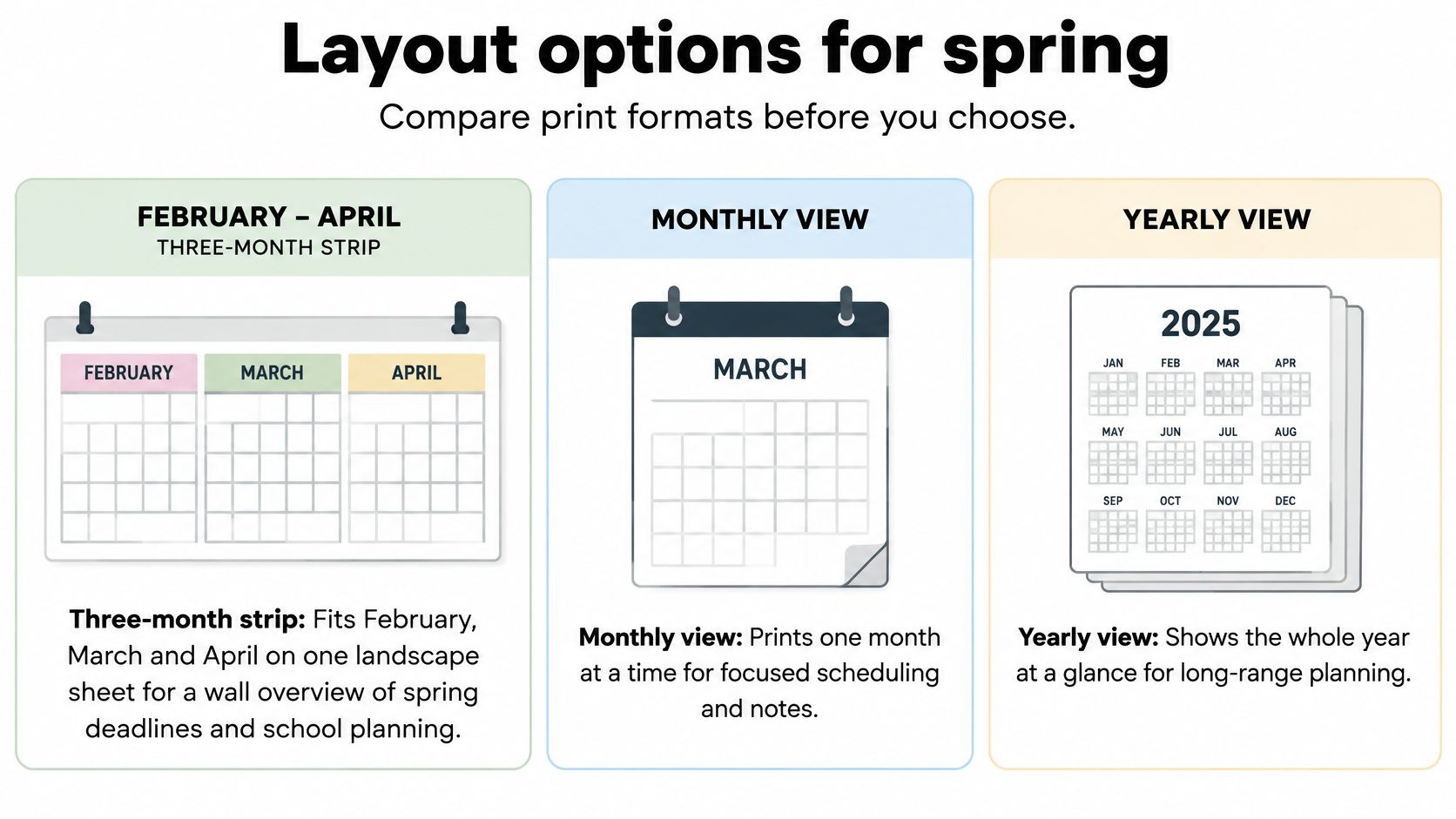
Two layouts cover February through April: a yearly sheet with all 12 months on one page, and monthly pages with one month per page. Pick by the job, not by how full the page looks. Week start and holiday markings are settings inside those layouts.
| Layout | Best for | Paper needed | Main trade-off |
|---|---|---|---|
| Yearly one-sheet calendar | Seeing where spring sits against the rest of the year | One sheet | Day boxes are small |
| Monthly pages | Appointments, school dates and handwritten notes | Three pages for February to April, or all 12 monthly pages | More pages to print and file |
Checks before you print
Writing space comes first. A yearly sheet shows spring deadlines, clock-change weekends and observance-heavy weeks in one view, but the day boxes will not hold a pickup time and a note. Monthly pages give room for appointments, household tasks and a reminder beside a date that may need checking before you rely on it.
Context is the next question. The yearly sheet works like a map: it helps you see whether a spring deadline lands near a time change or a religious observance before you commit. Monthly pages work like a notebook: they hold the details once the date is set.
Page count decides how much paper you manage. One yearly sheet is easy to pin up and easy to replace. Three monthly pages file in a folder for the period; taking all 12 monthly pages makes sense when the rest of the year needs the same treatment.
Markings should match how fixed the dates are. Turn on US federal holidays and observed dates for federal planning, or choose the blank grid when you want to pencil in provisional observances yourself. A blank calendar starting on Monday keeps the page clean when holiday marks would only get in the way. Match US Letter or A4 to the paper in the tray before you print.
Pick the yearly sheet when the question is where spring sits. Pick monthly pages when the question is what you will write on it.
Set Up, Download and Test Print Your Calendar
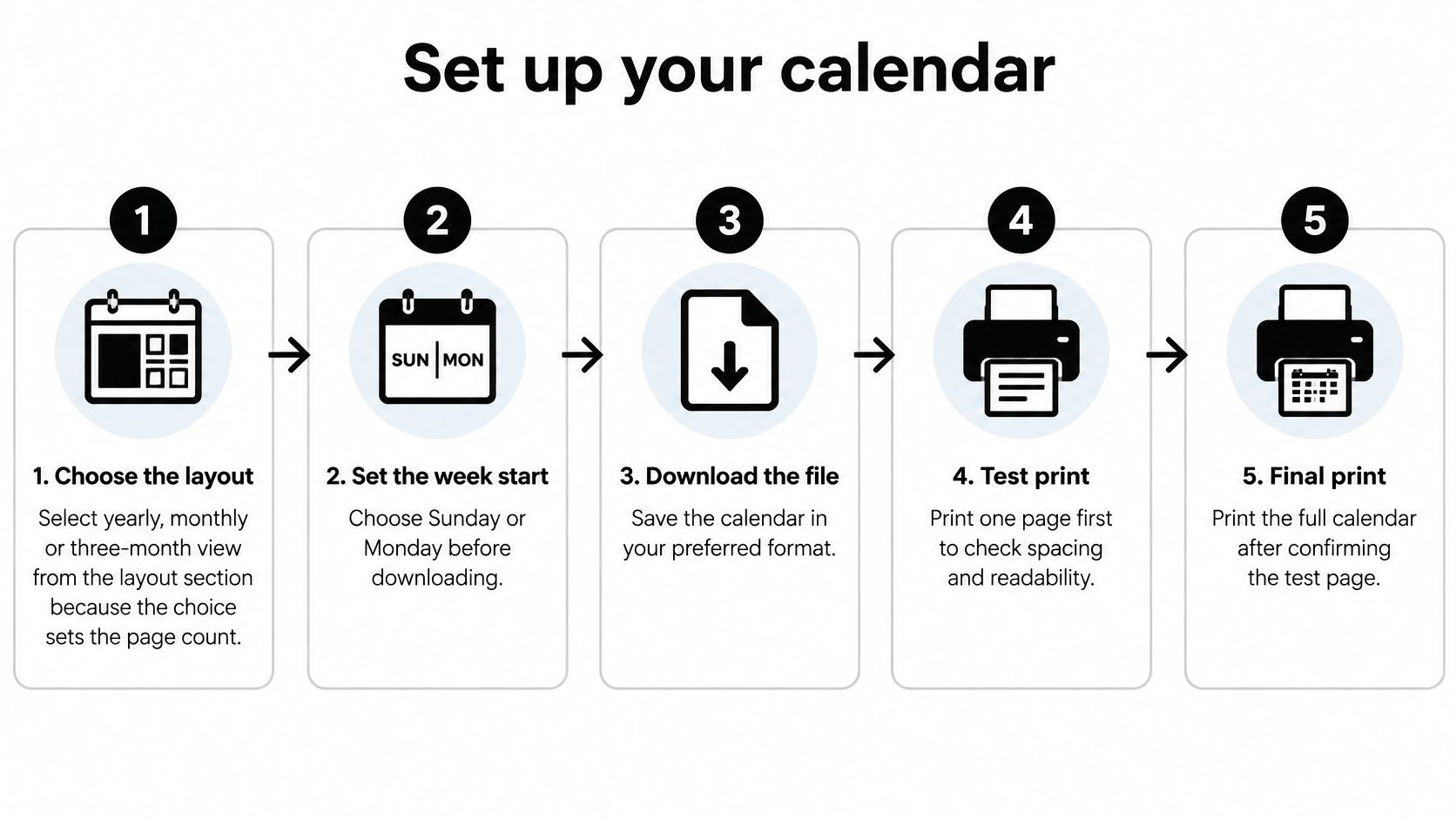
The settings work like a funnel. Each choice narrows the next, so order matters, and skipping ahead is how a whole stack prints with the wrong weekday headings.
- Choose the layout: yearly for a one-page overview of all twelve months, or monthly for a separate page per month. That decision sets the page count before you download anything.
- Set the week start to Sunday or Monday, matching work, school, or home. The wrong start shifts every heading off its dates.
- Select US Letter or A4 to match the paper sitting in the tray.
- Turn US federal holiday markings on or off. With markings on, federal holidays and observed dates appear on the grid. The blank version leaves every box clear for your own notes.
- Download the months you need. A monthly layout lets you take all 12 pages or only February, March, and April.
- Save the PDF or print straight from the page. Either path carries the settings you just chose.
- Print one test page on plain paper first. Check the preview, confirm the printer's paper size matches the size you selected, and make sure every day box and the header is visible before you run the full set.
Everything here is free, and no account or sign-up is needed. Two habits keep the printed result honest. Confirm any date you plan to act on against an authoritative source, because a printable grid can contain errors. And keep a small watchlist for this stretch of the year: the clock changes and religious observances between February and April deserve a light pencil mark until you verify them. When the planning horizon moves forward, the April 2027 calendar follows the same download path.
Fixing Print Problems Before They Waste Paper
Cut-off edges are the fault that ruins the most paper. If the right or bottom edge disappears, scaling is set to actual size. Switch to fit-to-page and look at the print preview before you send the rest of the file.
| Symptom | Likely cause | Fix |
|---|---|---|
| Right or bottom edge cut off | Printer scaling set to actual size | Choose fit-to-page and check the print preview |
| Calendar prints smaller than expected | Printer paper size differs from the calendar setting | Match US Letter or A4 on both the calendar and the printer |
| Weekday headings do not match the dates | Week start set to the other day | Reselect Sunday or Monday start and print again |
| Pages print blank or split across sheets | Portrait orientation used on a landscape PDF | Set the printer to landscape |
| Top header or title clipped | Top margin too small for the printer | Reduce scaling slightly and check the preview |
Read the symptom, then change one setting
A calendar that prints smaller than the preview almost always means the tray is Letter while the file is A4, or the reverse. Match the two, then print again. Don't scale on top of a size mismatch. You'll shrink a page that was already the wrong stock.
Headings that don't line up with the dates aren't a printer fault. The week start is the other day. Reselect Sunday or Monday and print one month only.
Blank or split pages usually mean portrait on a wide PDF. Set the printer to horizontal. A clipped title means the top margin is tighter than the printer can hold, so ease the scaling down a little and check the preview.
Practical rule: Print one month on plain paper, confirm every day box and the header, then print the full set.
Week Numbers and Date Formats for Shared Planners
Week numbers break shared planners when two people mean different weeks by the same numeral. ISO 8601 weeks begin on Monday, and week 01 is the week that contains the year's first Thursday. An ISO week can start in the previous Gregorian year or run into the next one. ISO years hold 52 or 53 complete weeks.
From the 2026 anchors, 1 February is a Sunday, so it closes an ISO week rather than opening one. The next day, Monday 2 February, opens the following week. A Sunday-start wall grid is not an ISO week calendar, even when the dates are right.
What to label, and how to write the date
Label week numbers only when the tool explicitly follows ISO 8601. Keep the week-start choice, which is only a visual, separate from the date calculation. Writing "week 10" on a Sunday grid sends a colleague to the wrong seven days.
For anything you exchange, write 2026-03-01, not 03/01/2026. The slash form means 1 March in some countries and 3 January in others. One shared file with mixed slash dates will move a meeting by two months without anyone editing the time.
A Sunday-start visual grid is a layout. It isn't a week-number system.
Time Changes Between February and April 2026
People often assume every country moves its clocks on the same Sunday. They don't. Time and Date's 2026 daylight-saving list puts the change on 8 March in most of the United States and Canada, 29 March in the United Kingdom and much of Europe, 5 April in most of Australia, and 24 April in Egypt. Hawaii and most of Arizona don't observe daylight saving time at all.
What that does to a standing meeting
Say a Monday video call is fixed for 9 a.m. New York time. After 8 March, and before London changes on 29 March, the gap between those cities is an hour smaller than it was in February. Nobody edited the invite. The clocks did. A school pickup, a shift handover, or a call with a relative in Cairo can slip the same way on a different date.
Keep a short time-change watchlist on the calendar itself:
- Region: who is on the call or the pickup.
- Change date: 8 March, 29 March, 5 April, or 24 April, or "no change" for Hawaii and most of Arizona.
- What to rewrite: the recurring meeting, the school run, or the shift note.
Calendars are for general planning and can contain errors, so check an authoritative local source before you rely on a date. Don't assume the whole world moves on the American Sunday.
Religious Observances and Provisional Dates to Mark
In 2026, write the lunar observances as windows first, then ink the confirmed day later. A school district guide to religious observances expects Ramadan to run from about 18 or 19 February through about 18 or 19 March, with the exact start and end set by moon sighting. Easter Sunday falls on 5 April in 2026; it is a movable feast set by the paschal full moon, so mark it as a 2026 date rather than a fixed annual one.
Approximate, confirmed, and blank
Use three marks so the grid stays honest: approx. beside lunar dates, a firm ink line after a local authority confirms them, and a small blank box where the confirmed day will go. Treat each moon-sighting announcement as local unless your own community confirms it. A printed date can look settled while the observance is still waiting on a sighting, which is how false precision creeps into fasting days, Eid plans, and family travel.
The practical effect is timing. Fasting hours can move meals, school routines, exam energy, travel plans, and workplace events inside the same February-to-March window as ordinary deadlines. Easter brings a different problem: the date is known for 2026, but service times and local customs still vary by congregation.
Before booking travel, an exam, or a team event, confirm provisional dates with the religious authority or institution that sets the schedule. Keep "approx." on the grid until that confirmation arrives, then fill the blank you left.
Dayleaf makes free printable calendars for everyday planning, including yearly and monthly layouts you can download as a PDF or print from the browser, with no account required. Use the anchor dates and blank boxes from this guide to mark provisional observances cleanly, then choose a week start, paper size, and holiday option at Dayleaf for a sheet you can plan on.