February 2027 Calendar: Printable Layouts and Holidays
Compare printable February 2027 calendar layouts, check US holidays and weekday counts, and set print options so your printout fits the page.
A tidy date grid is the least useful thing a February 2027 calendar can offer. What matters is capacity: which weekdays your household, school or international team can use once local holidays and observances land on the page. Count your workable days first, then mark closures and personal commitments before treating an empty square as free time.
February 2027 at a Glance
Twenty weekdays on paper is not twenty usable days. February 2027 packs its 28 days into four clean weeks, which makes the capacity math quick to run before anything gets written on the page.
February 2027 date facts
| Fact | Value | Planning note |
|---|---|---|
| Days in month | 28 | Four full Monday-to-Sunday weeks |
| First day | Monday, February 1 | Monday-first grid starts cleanly |
| Last day | Sunday, February 28 | No spillover into March |
| Weekdays (Monday to Friday) | 20 | Before local holidays |
| Weekend days | 8 | Four Saturdays and four Sundays |
| US federal observance | Washington's Birthday, Monday, February 15 | 19 ordinary weekdays for federal employees on a standard schedule |
The US Office of Personnel Management's 2027 federal holiday schedule lists Washington's Birthday on Monday, February 15, which leaves 19 ordinary weekdays for federal employees following a standard Monday-through-Friday schedule. The month's complete Monday-to-Sunday blocks run February 1-7, 8-14, 15-21 and 22-28, so every weekday appears exactly four times and the month works as a clean baseline for comparing capacity against longer ones.
Read the federal-holiday row narrowly. Washington's Birthday closes federal offices, but it does not automatically close a private business, school or workplace abroad, so two people sharing one printed grid can plan against different totals. A team outside the US may treat February 15 as an ordinary Monday, which is why usable weekdays need to be counted for each country's observances rather than read straight off the grid. Count capacity by subtracting the closures that apply to the group using the calendar, not the closures that happen to be printed on it.
Verify the dates before the design
A printed page that misplaces a date shifts every appointment copied onto it. Check that February 1 sits under Monday and February 28 under Sunday before spending time on margins or handwriting space. If you print with US federal holiday markings turned on, confirm the marked days match the closures your schedule observes; the markings can also be switched off for a blank grid.
Keep cross-month commitments off the main grid. If a project runs past February 28, carry it onto a matching calendar page for the following month instead of squeezing future appointments into February's notes area.
Before printing: Confirm the complete weeks, the weekday count for each schedule and whether holiday markings are on or off.
Yearly, Monthly and Single-Month Layouts
Calendar formats compared
| Format | Best for | Writing space | Printing note |
|---|---|---|---|
| Yearly calendar, all 12 months on one sheet | Seeing 2027 capacity at a glance | Small date cells | One page, limited room per date |
| Monthly set, 12 separate pages | Appointments and household schedules | Large cells for names, times and places | Print all pages or only the months you need |
| February-only page from the monthly set | Short-term planning | Most focused space for one month | Print just February 2027 |
Treat the choice as a capacity decision. The yearly sheet shows where February sits inside the whole year, but each date gets little room. The monthly set gives February a full page, so workable days, closures and handovers have space to be written plainly. A February-only printout narrows attention to the current planning window and avoids carrying eleven extra pages to the printer.
Choose the yearly sheet when the question is “where does this date fall in 2027?” Choose the monthly set when people will write commitments on the page. Choose the February-only page when the immediate month is the only window that matters.
Dayleaf offers these formats with a Sunday or Monday week start, US Letter or A4 paper size, and optional US federal holiday markings. The holiday option marks federal holidays and observed dates; the blank version leaves those cells clear for local closures that reduce your usable days.
Match the format to the writing task
A yearly calendar works well beside a desk for checking the weekday of a future deadline. It works poorly as a shared appointment book because small cells encourage cramped abbreviations that other people may not understand.
Monthly pages are better for a kitchen noticeboard, classroom folder or household binder. Leave enough space for a person's name, an appointment time and a location rather than choosing a decorative design that consumes the writing area.
A single-month sheet suits a temporary project, revision schedule or short-term care arrangement. If you are carrying unfinished tasks forward, keep the previous month's page beside it while transferring commitments, then remove the old page once every open item has been checked.
- Choose the week start deliberately. Match the convention people already use rather than asking everyone to relearn the page.
- Select the intended paper size. Prepare the document for US Letter or A4 before opening the print dialog.
- Keep irrelevant markings off. A blank version gives you room to add local closures without confusing them with federal observances.
Horizontal output generally gives handwritten entries a useful shape. Shrinking a busy monthly page onto an annual sheet rarely preserves that usefulness.
Choose an annual page for reference and a monthly page for decisions that need names, times and notes.
Sunday-First or Monday-First Week Layouts
The week-start convention decides how visibly February's 20 weekdays group together on the page, so compare the opening and closing rows before choosing one.
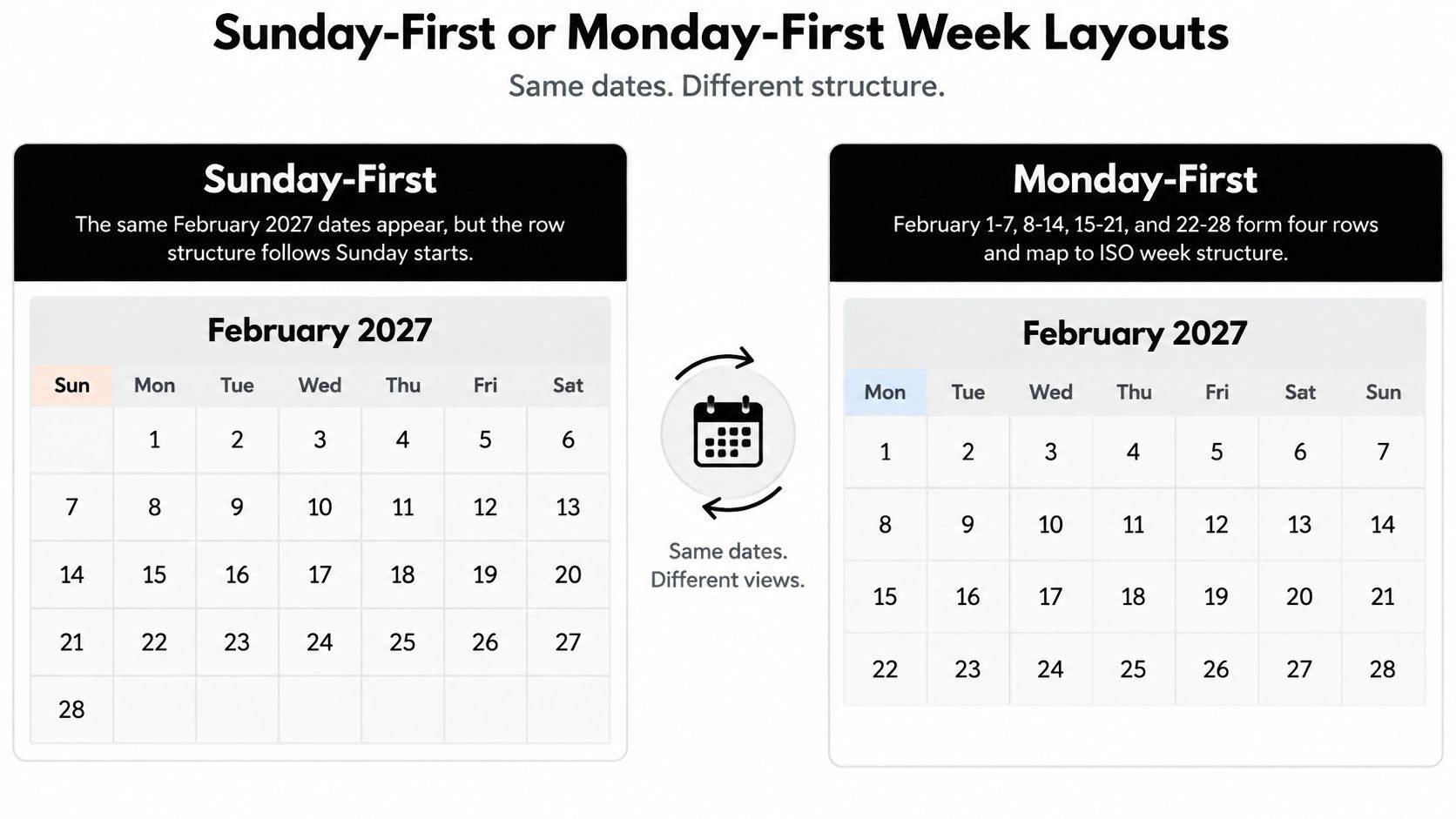
The Time and Date monthly calendar shows why February 2027 occupies four populated rows in a Monday-first grid, corresponding to ISO weeks 5-8, but five visual rows in a Sunday-first grid. The row-by-row arrangement is:
February 2027 grid rows by week start
| Row | Monday-first grid | Sunday-first grid |
|---|---|---|
| Row 1 | February 1-7 | January 31, February 1-6 |
| Row 2 | February 8-14 | February 7-13 |
| Row 3 | February 15-21 | February 14-20 |
| Row 4 | February 22-28 | February 21-27 |
| Row 5 | Not needed | February 28 only |
Read the opening row first. The Monday-first version begins immediately with the month, while the Sunday-first version reserves the opening Sunday position for the preceding month, whether that date is printed or left blank.
The boundary between working days and the weekend also shifts. In the Monday-first grid, Saturday and Sunday sit together at the right edge of every row, so the five usable weekdays form one unbroken block you can scan or count at a glance. In the Sunday-first grid, Sunday sits at the left edge and Saturday at the right, splitting the weekend across both sides of the page. At the bottom, the final Sunday needs its own row, so a nearly empty strip still consumes useful page height.
Choose familiarity or extra cell height
With the same page dimensions, a Monday-first design can allocate more vertical space to each populated row. That matters for stacked handwritten entries, such as school pickup, an appointment and an evening activity, and it keeps the working-week block contiguous when you are counting available days for a deadline.
A Sunday-first page can still be the better choice if your household reads calendars that way. Familiarity outweighs saved space when someone might copy an appointment into the wrong column.
If you want that unbroken five-day working block without holiday labels taking up cells, a blank calendar that starts on Monday keeps the grid clear. Before printing, count the populated rows in the preview and check the opening date against its weekday heading.
For a video reference alongside the grid comparison:
Holidays and Dates to Mark on the Page
Dates to mark in February 2027
| Date | Observance | Type | Marking note |
|---|---|---|---|
| Saturday, February 6 | Lunar New Year | Public holiday in some countries | Lunar-calendar date, confirm local holiday arrangements |
| Around February 8 | Ramadan begins | Religious observance | Confirm through local crescent-moon announcements |
| Sunday, February 14 | Valentine's Day | Cultural observance | Weekend date, not a statutory holiday |
| Monday, February 15 | Washington's Birthday, observed | US federal holiday | Include when federal holiday markings are on |
The Wishmagic February calendar places Lunar New Year on February 6 and the expected beginning of Ramadan around February 8, with Ramadan's exact start dependent on local crescent-moon observation. Treat that distinction as a practical instruction: mark an established calendar date normally, but pencil in a locally confirmed religious start date.
For US federal scheduling, Washington's Birthday is the relevant closure to check. Keep its marking if it affects your work, school transport or service access; otherwise, don't let the label imply that everyone sharing the page has the day off.
Separate observance from closure
An observance and a day off aren't interchangeable. A family may celebrate an occasion without a statutory closure, while an employer may close for a public holiday that another household member doesn't observe.
Use different visual treatments for these meanings. A shaded cell can indicate that someone is unavailable, while an underlined label can indicate an occasion without implying a full-day absence.
- Confirmed closure. Write the affected person, workplace or school beside the holiday.
- Religious observance. Add practical arrangements, such as changed meal plans or preferred meeting times, only after asking the people involved.
- Date awaiting confirmation. Use pencil and add a reminder to check the local announcement.
- Cultural commitment. Record the actual reservation, visit or event rather than assuming the whole day is blocked.
Leave room for local arrangements
A calendar containing only US federal labels won't capture every international scheduling constraint. Ask overseas colleagues about their actual office closures, and check school notices rather than assuming the national holiday calendar describes the school term.
For households observing more than one tradition, put preparation tasks in the notes area instead of crowding the observance cell. Shopping, travel and hosting arrangements may require attention before the occasion itself.
Mark availability, not just significance. A holiday name tells you what the occasion is; a closure note tells you what you can schedule.
Our calendars are provided for general planning and may contain errors. Before relying on a holiday for travel, employment arrangements or another consequential commitment, check an authoritative government, employer or local religious source.
Counting Usable Workdays Across Countries
A February grid is a capacity problem before it is a date list. February 2027 has 20 Monday-to-Friday weekdays, and the usable total falls only when a real closure, leave block or reduced-hours rule lands on one of those days.
Capacity count for February 2027
| Counting layer | What to enter | Effect on usable weekdays |
|---|---|---|
| Weekday baseline | 20 Monday-to-Friday days | Starting capacity before exceptions |
| Nationwide closure | A weekday holiday confirmed for the relevant country, such as Washington's Birthday on February 15 for a US worker | Subtract only for people governed by that calendar |
| Regional, school or workplace closure | Provincial, state, territory, site or school closure affecting a named office or person | Subtract for that group |
| Personal exception | Leave, training, reduced hours, travel recovery | Reduce that person's remaining days |
The same printed month can carry different totals. A US office may lose February 15 while an overseas office stays open; a plant shutdown or school break can remove more capacity than a public holiday. Turn US federal holiday markings off or use a blank page when the audience follows another calendar, then write in the closures that apply.
Treat country names as routing labels, not answers. Before counting usable days for the United States, United Kingdom, Canada, Australia or any other country, check that country's official national and regional holiday calendars, then confirm the workplace or school schedule behind the date.
Add a capacity overlay
Use the printed month as a capacity map rather than an attendance ledger. Light shading works well because it leaves appointment text readable.
- Shade committed weekends. Include travel, hosting and community obligations that make the following work period harder to use.
- Identify the affected group. Label a closure with an office, school or person rather than a country name alone.
- Reserve an exceptions area. Record leave, training, school closures and reduced hours outside the date cells.
- Protect handoff time. Put approval and delivery checkpoints on days when both sides are available.
Say a household plans to complete paperwork during an apparently open weekend. If that weekend also contains a family celebration, the sensible choice is to move the paperwork, not keep both commitments in the same square.
For a team, count the days when the people needed for a task can participate. Start from 20 weekdays, remove confirmed shared closures for each office, then subtract personal exceptions from the appropriate person's availability.
Astronomy Dates Worth Adding to a Printed Month
For an educator or observing group, a monthly page can hold sky events alongside practical arrangements. The In-The-Sky astronomy calendar lists an annular solar eclipse on February 6, Jupiter at opposition on February 11, first quarter Moon on February 14, Mars at opposition on February 19, a full Moon and penumbral lunar eclipse on February 20, and last quarter Moon on February 28.
Transfer those entries in date order, using short labels rather than full explanations. An annular solar eclipse occurs when the Moon appears smaller than the Sun, leaving a bright ring around the lunar disk for observers within the appropriate path.
Jupiter's opposition places it opposite the Sun in Earth's sky, making it observable through much of the night. A class or astronomy club could mark that event as a candidate observing session, then check local conditions before treating it as a confirmed outing.
Turn sky dates into usable appointments
- Solar eclipse. Add a visibility-check reminder rather than assuming the event can be seen locally.
- Planetary opposition. Note the intended observing location and who will bring the telescope.
- Moon phases. Use a small lunar symbol and keep the cell available for ordinary appointments.
- Lunar eclipse. Distinguish the astronomical event from any public session arranged around it.
A penumbral lunar eclipse produces subtler shading than a partial or total lunar eclipse because the Moon passes through Earth's outer penumbral shadow. Set that expectation when planning a school activity so participants don't expect a dramatic dark bite out of the Moon.
Keep the event label brief and put equipment, weather alternatives and meeting details in the notes area. Confirm exact local times and visibility before organizing an outing, and never treat a printed eclipse label as guidance for safe solar viewing.
How to Print the Calendar at Full Size
A useful printout needs readable cells and intact borders, not the largest possible image. Prepare the document first, then let the preview reveal whether your printer can reproduce it without clipping.
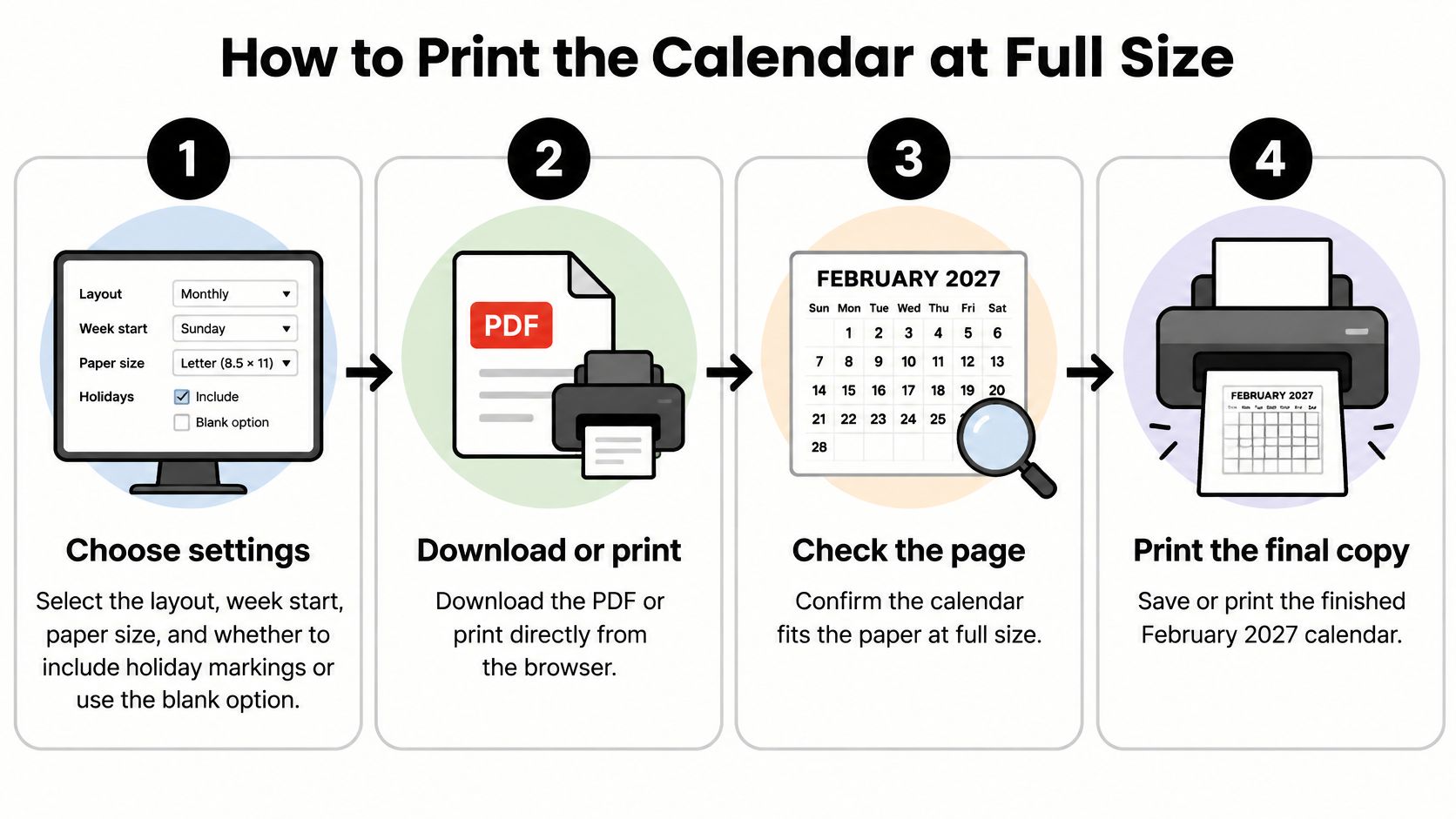
Use this visual checklist beside the print dialog.
Prepare the document and printer
Choose the layout and calendar settings. Select the format, week start and paper size, then decide whether federal holiday markings belong on the page. Make these choices before downloading so you don't print an earlier version by mistake.
Download the PDF, or use the browser's print command. A saved PDF is convenient when you want to reopen the same document in Adobe Acrobat Reader without rebuilding the calendar settings.
Match the paper size in the printer settings. If the document was prepared for A4, select A4 in the print dialog and load that paper; do the equivalent for US Letter. A mismatch can change the scale or push borders outside the printable area.
Set the orientation to horizontal for the PDF. Check the preview rather than relying on automatic rotation, especially when the browser and printer driver each expose their own orientation control.
Check the preview before using paper
Inspect every edge and the date alignment. Look for the outer border, weekday headings, opening date and closing date. Disable browser headers and footers if they add unwanted page titles or addresses around the calendar.
If an edge is cut off, select fit to page and check the preview again. Print a test page before sending a complete set, because a small reduction is usually more useful than a nominally full-size page with missing content.
Print only the pages you need. For a monthly set, check the PDF thumbnail pane or page-range field instead of assuming the document's page number matches the month number.
“Actual size” is appropriate only when the entire design fits inside your printer's printable area. Fit-to-page scaling may reduce the writing space slightly, but it preserves the border and labels that make the page usable.
Printer check: Judge the test sheet by legibility and complete edges, not by the scale percentage alone.
Once printed, write a sample appointment in a cell to check that the space suits your handwriting. Our calendars may contain errors, so verify consequential dates against an authoritative source before relying on the finished sheet.
Confirm Your Settings and Print February 2027
The final check should focus on whether someone else could use the page without an explanation. A familiar week start, clear availability markings and readable notes matter more than filling every blank area.
Keep the calendar beside the schedule you're transferring while you make the final check.
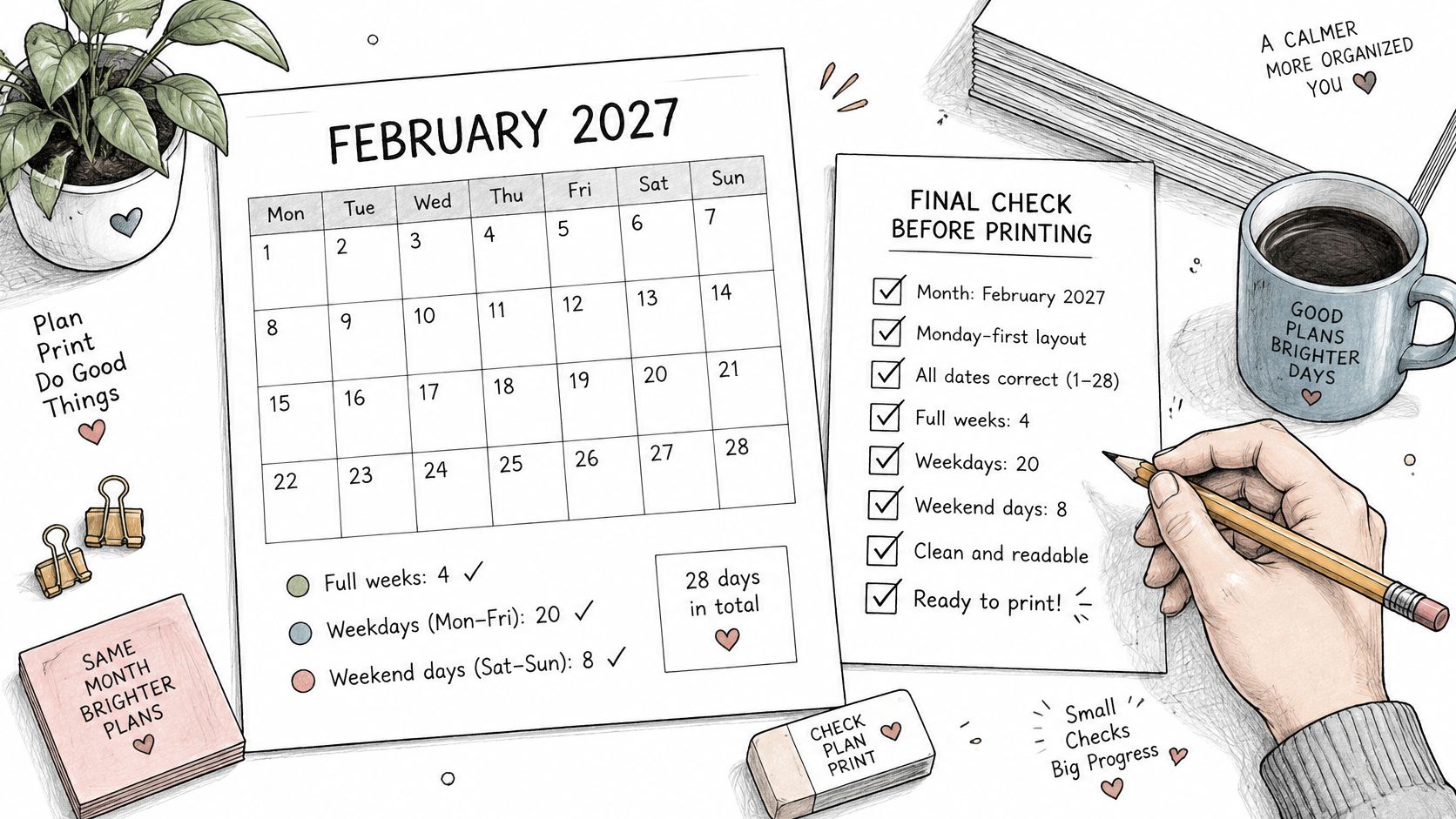
A final readiness check
- Calendar convention. The weekday headings match how your household, school or team reads a month.
- Printer setup. The selected paper size matches the loaded paper, and the preview preserves the edges.
- Availability markings. Closures are distinguishable from celebrations and dates awaiting local confirmation.
- Handwritten space. There's room for names, times and locations without covering the date numbers.
- Official commitments. Legal deadlines and other consequential dates have been checked with the responsible authority.
You don't need an account to select settings and download a PDF or print from the browser. Keep the saved document if you'll need a replacement, and avoid transferring unconfirmed pencil notes into permanent commitments.
Questions, feedback and reports of calendar errors can be sent to the Dayleaf team at support@printable-calendar-free.com. Include the affected month, setting and date so the team can identify the issue clearly.
Dayleaf offers free printable calendars for turning February's dates into a practical household, school or work schedule. Open the calendar, choose your layout, week start, paper size and holiday visibility, then print a test page before making your final copy.