Free Printable January 2027 Calendar: Yearly and Monthly
Free Printable January 2027 Calendar in yearly and monthly PDF formats, with US holiday options, Sunday or Monday week starts and print-size tips.
Why do two printable calendars for the same month give you different amounts of writing space? The dates are the same. What changes is the week start, the number of rows in the grid, and the paper size.
A free printable January 2027 calendar needs to do more than display the right dates. It should match how you plan, whether that means checking the year at a glance, coordinating a household, or following the week numbers your workplace uses. One detail most printables leave unexplained is the ISO week boundary between 2026 and 2027, where a week-53 year can change how the grid lines up.
Choose Yearly or Monthly for January 2027
Choose yearly for reference and monthly for writing. That choice changes the printout more than color or decoration, because page count sets the ceiling for cell size, while week start, row count and paper size decide how those cells are arranged.
A yearly calendar puts all 12 months on one sheet. It suits wall or desk reference: checking where January sits before a break, seeing whether a deadline lands early or late in a quarter, or comparing months without turning pages. The trade-off is small date cells.
A monthly calendar gives the selected month a page of its own. For a household, that can mean room for appointment times, school reminders and initials showing who needs to be where. For an educator, it can separate teaching commitments from preparation tasks without squeezing everything into tiny boxes.
Yearly versus monthly January 2027 printables
| Format | Pages | Best for | Writing room per day |
|---|---|---|---|
| Yearly calendar | One landscape sheet with all 12 months | Overview of dates across 2027 | Small date cells |
| Monthly calendar, full set | 12 separate pages | Appointments, school dates and household schedules | Larger date cells for handwriting |
| Monthly calendar, single month | One page for January | Planning January only | Same date cells as the full monthly set, with fewer pages to handle |
Match the page to the task
Treat the single-month option as a subset of the monthly set. Choosing January alone uses the same layout and the same date cells as the January page inside the 12-page set; the gain is fewer downloads and fewer sheets to store.
If a course continues into spring, keep the yearly sheet nearby for sequence and add a monthly page for a later month when dated entries begin. Use the yearly sheet like a map, then let monthly pages carry the handwriting.
Don't choose a yearly sheet expecting it to behave like an appointment book. Likewise, don't print a full monthly set if you only need a quick date reference.
Practical rule: If you mainly need to see when dates fall, choose yearly. If you'll write inside the boxes, choose monthly.
How January 2027 Lays Out in Sunday and Monday Grids
January's opening row can look unusually empty without anything being wrong. January 2027 has 31 days, begins on Friday, and ends on Sunday, with 21 weekdays and 10 weekend days. Friday, Saturday and Sunday occur five times each, and Monday through Thursday occur four times each.
The important distinction is between a date's weekday and its position within a printed row. Changing the week start moves the columns and row breaks. It doesn't change which weekday a date falls on. The setting works like sliding a window along a fixed strip of dates: the dates stay in the same order, but the frame around them shifts.
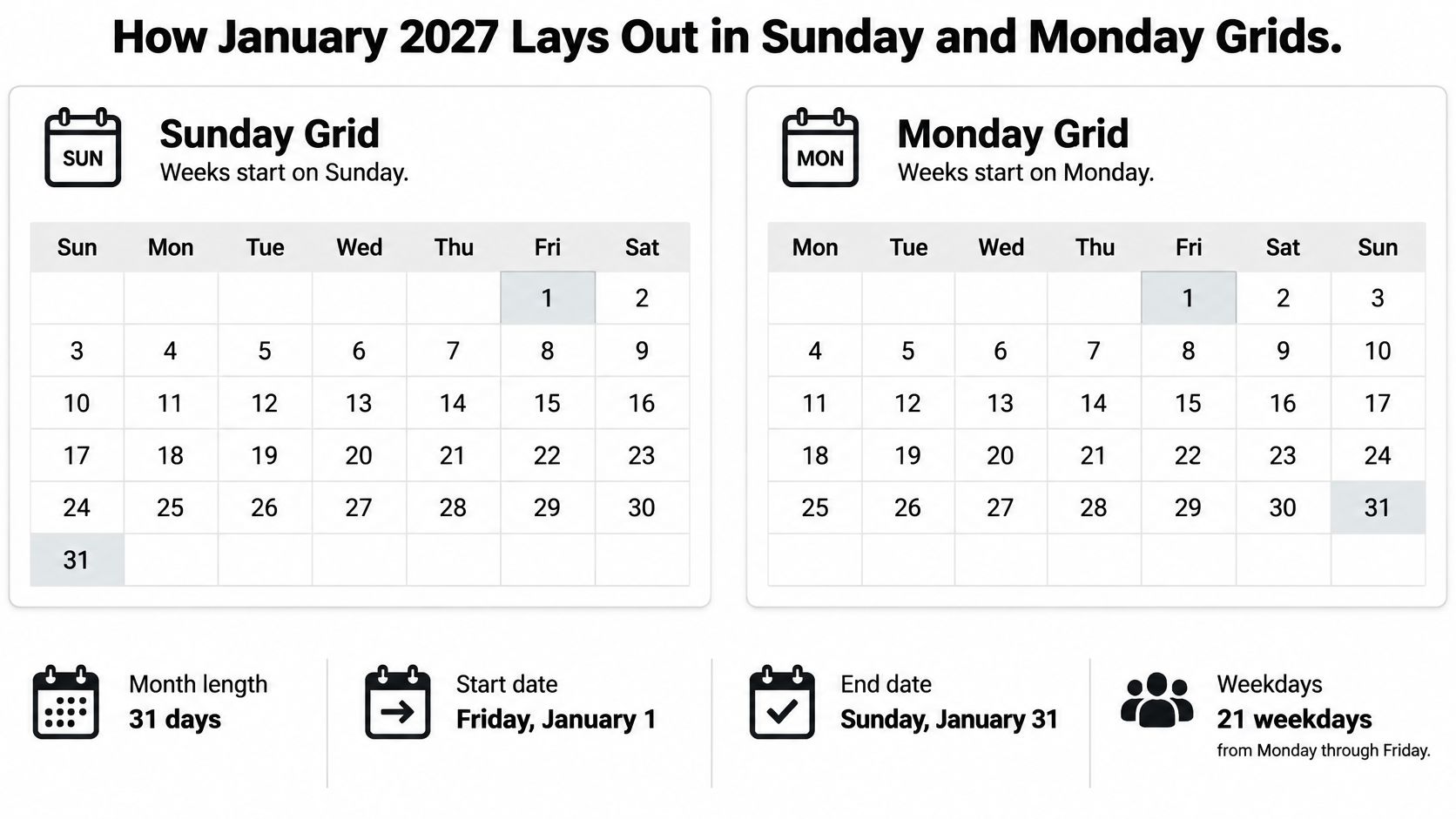
January 2027 date grid by week start
The layouts below are calculated from that opening weekday and month length. Each sequence runs from the leftmost column to the rightmost column in its chosen grid.
| Grid row | Sunday-start layout | Monday-start layout |
|---|---|---|
| Row 1 | Blank, Blank, Blank, Blank, Blank, 1, 2 | Blank, Blank, Blank, Blank, 1, 2, 3 |
| Row 2 | 3 to 9 | 4 to 10 |
| Row 3 | 10 to 16 | 11 to 17 |
| Row 4 | 17 to 23 | 18 to 24 |
| Row 5 | 24 to 30 | 25 to 31 |
| Row 6 | 31 | Not used |
Why the row count matters
The Sunday-start version needs six date rows, while the Monday-start arrangement fits into five. You can see why in the first row: five blanks precede the 1st in a Sunday-start grid, but only four precede it in a Monday-start grid, so the month finishes one row earlier. If the header, margins, and overall grid height stay the same, fewer rows allow taller date cells.
That doesn't guarantee that every Monday-start template offers more writing room. A designer might reserve extra space for notes or keep row heights fixed. Inspect the actual preview rather than assuming that changing the week start automatically enlarges the boxes.
A blank calendar starting on Monday suits readers who want the working week first and the weekend together at the right edge, which January 2027 makes especially tidy: the 2nd and 3rd sit side by side in row one. A Sunday-start layout may feel more familiar if that's what your family or school already uses.
Check the weekday headings before checking the dates. The opening date belongs under Friday in either version; only its column position changes.
Week Numbers Across the 2026 and 2027 Boundary
January's first date opens a new calendar year while still carrying the previous ISO week-year label. Those are different ways of identifying a day, and mixing them up can drop a recurring task into the wrong reporting week.
The Fresh Calendars explanation of January's week transition places January 1, 2027 in ISO week 53 of 2026, before the month continues through weeks 1 to 4 of 2027. Under that sequence, the opening Friday through Sunday retain the previous ISO week-year, and the following Monday begins the new one.
Calendar year versus week-year
The calendar year is the year printed at the top of the monthly page. ISO week dating works like a fiscal label: days are grouped into Monday-start weeks, and each whole week is assigned to a week-year that can differ from the calendar year on the page. That is why a date can correctly show a new calendar year while keeping the previous year's ISO week label.
The fix is a labelling habit, not a layout change. Leave the calendar title and the date boxes as printed, and add the ISO identifier in a narrow margin beside the relevant week.
A week number is useful only when everyone using the calendar follows the same numbering convention.
This matters when a team says "submit during week one" without naming a system. A school counts teaching weeks, an employer counts payroll periods, and an international operations team counts ISO weeks. Those labels aren't interchangeable, so a commitment copied from one system can land a week early or late in another.
- For ISO-based work: Write the week-year alongside the week number around the boundary.
- For household planning: Skip week numbers unless they help coordinate a real activity.
- For shared schedules: Copy the convention used by the organisation that set the deadline.
A Sunday-start page can split one ISO week across two visual rows, so counting rows from the top will misnumber the weeks. Ask your team a concrete question instead: Which week does the first Monday of this January belong to? Agree on the convention before copying recurring commitments into the new planner.
Federal Holidays and Observed Dates in January 2027
The U.S. Office of Personnel Management's holiday schedule lists New Year's Day on Friday, January 1, 2027, and Birthday of Martin Luther King, Jr. on Monday, January 18, 2027. Both fall on weekdays, so neither needs a substitute observed date in the federal schedule.
That distinction matters when reading a holiday-marked calendar. The holiday date identifies the occasion itself. An observed date is the substitute date used when a holiday falls on a day that requires observance elsewhere. For these January federal holidays, the listed dates and observed dates line up.
US federal holidays in January 2027
The weekend patterns below help explain how each holiday sits inside the monthly grid.
| Holiday | Date | Weekend pattern | Dates covered |
|---|---|---|---|
| New Year's Day | Friday, January 1 | Friday to Sunday | January 1 to 3 |
| Birthday of Martin Luther King, Jr. | Monday, January 18 | Saturday to Monday | January 16 to 18 |
Think of the holiday label as a marker placed on the calendar grid, like a bookmark in a planner. It tells you which date has federal significance, but it does not automatically describe every workplace, school, or household schedule.
Using the weekday count and federal holidays in that schedule, 19 weekdays remain after excluding the two federal holidays from January's 21 weekdays. Use that as a planning calculation for a Monday-to-Friday schedule that excludes those holidays, not as a statement about anyone's actual working days.
Private employers, schools, and state governments may follow different arrangements. Before booking travel or assuming an office will be closed, check the organisation's own published schedule.
Dayleaf lets you turn US federal holiday markings on or off, and a blank calendar without holiday markings is also available. When the markings are on, they show US federal holidays and observed dates. That gives you a clean base grid first, then a holiday layer you can choose to use.
A useful printed holiday marking should stay readable without taking over the date cell. A short label, a light shaded background, or a small symbol with a legend can distinguish the holiday while preserving space for personal notes.
- Keep the name accurate: Use the official holiday name where space permits.
- Explain the marking: A legend should identify the highlighted dates as US federal holidays.
- Separate personal closures: Write an employer's shutdown or school break as its own entry rather than assuming the federal label covers it.
For example, a household might mark a federal holiday and still need to add a childcare arrangement or a work shift. Those practical commitments are what turn a reference calendar into a usable schedule. The same approach helps when a Sunday-start and Monday-start grid place the holiday in different visual rows. The date stays the same. Its position in the grid changes.
Dayleaf calendars are provided for general planning and may contain errors. Check an authoritative source before relying on a date that affects pay, travel, school attendance, or an important appointment. The website and downloads are provided as available, and features may change or be temporarily unavailable.
Holiday Markings for Readers Outside the United States
A blank holiday setting is often the better starting point for an international planner. It lets you add dates that affect your life without treating another country's public-holiday system as your own.
The OPM federal-holiday calendar is specifically a United States federal reference, not a worldwide closure list. A calendar carrying those markings therefore needs a clear regional label. It shouldn't imply that every highlighted date closes schools or workplaces wherever the page is printed.
A religious observance, a regional public holiday, and a school closure can all matter to the same household for different reasons. Labeling the type of entry helps readers understand whether it affects attendance, business hours, family activities, or personal practice.
Add only the dates you use
Keep the printed grid uncluttered and build a local layer by hand. You might use a small letter beside an entry, with a short key in the notes area.
- Public or regional holiday: Confirm it against the relevant government calendar.
- Religious or cultural observance: Record it when it matters to your household, with a label that doesn't imply a universal closure.
- School-related date: Use the school's own term calendar or announcement.
- Personal commitment: Write the time and action needed, not just the occasion's name.
Before trusting a regional calendar, compare a few dates you already know against local government and school schedules. If a familiar closure is missing or a label seems too broad, investigate before adding the rest.
Avoid filling every cell with icons. A calendar should leave room for the appointment, collection time, or reminder you need to act on.
Check the Dayleaf website for the current calendar before printing rather than relying only on an older saved file. Questions, feedback, or reports of calendar errors can be sent to our team at support@printable-calendar-free.com.
Paper Size, Margins and Print Settings
Match the document size to the paper in the tray before adjusting scale. A correct calendar can still print badly if the file and printer settings use different page formats.
The A4 paper-size reference documents A4 at 210 × 297 mm, or 8.27 × 11.69 inches; the print specifications used here pair that with US Letter at 8.5 × 11 inches. In horizontal orientation, those page dimensions become 297 × 210 mm and 11 × 8.5 inches, respectively.
Paper sizes for January 2027 printables
| Paper size | Portrait dimensions | Landscape working area | Usual use |
|---|---|---|---|
| A4 | 210 × 297 mm (8.27 × 11.69 in) | 297 × 210 mm | Most countries outside North America |
| US Letter | 8.5 × 11 in | 11 × 8.5 in | Home and office printers in the United States |
These are page dimensions, not a promise of borderless printing. Your printer may need unprinted margins around the edge, leaving a smaller usable area.
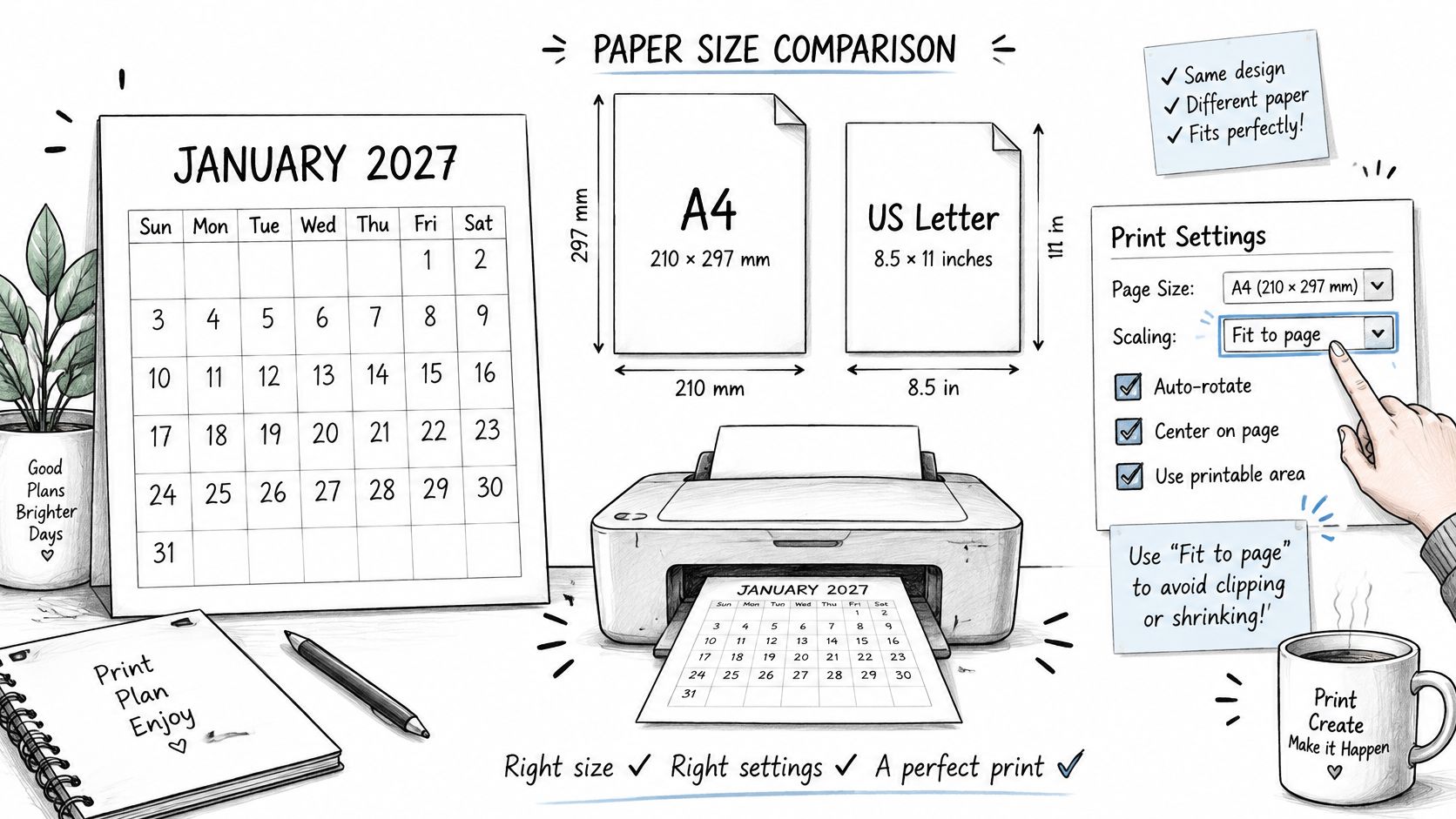
Follow a reliable print routine
- Select the matching paper size on the calendar page. Check the packet or tray label if you're unsure what paper is loaded. Don't assume the printer's default matches it.
- Use the same size in the printer dialog and select horizontal orientation. The document and printer should agree before you judge the preview.
- Inspect the complete page. Look at the outside border, weekday headings, bottom row, and any notes beneath the grid.
- If the edges are clipped, choose Fit or Shrink to printable area. Preserve the aspect ratio so the boxes aren't stretched. Avoid Fill, which can enlarge the document enough to cut off content.
- Print a test page on plain paper. Check the smallest text and try writing a typical appointment into a cell before using your preferred stock.
Scaling an A4 file onto Letter paper, or the reverse, can change margins and reduce writing space. Selecting the correct file size first is better than repeatedly shrinking a mismatched page until it happens to fit.
Print check: A successful preview shows the complete calendar without stretching, cropping, or unexpectedly tiny text.
If the preview looks right but the paper copy is clipped, inspect the printer driver's margin and scaling settings. Browser printing and a PDF viewer may expose those controls differently, so use whichever gives you a clear full-page preview.
Apply the same routine when printing an April, May and June calendar. Consistent settings make pages easier to file together and compare.
Choose Settings and Download the Calendar
Make your selections before opening the print dialog. It's easier to correct the calendar itself while the settings are visible than to discover a mismatched layout after saving the file.
The settings guide shows the basic selection sequence.
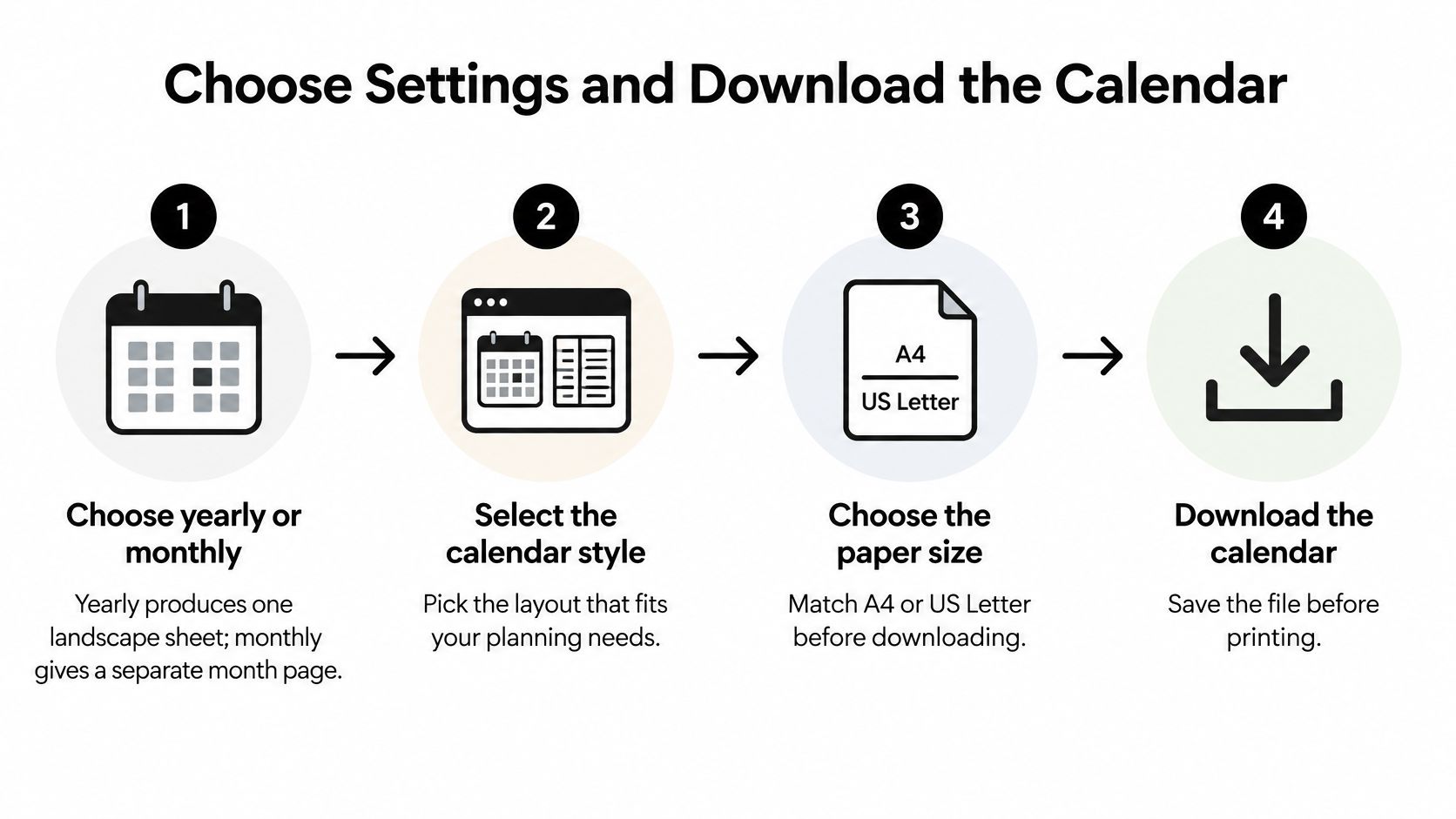
Make the choices in order
Choose yearly or monthly. Select the annual overview if you're making a reference sheet. For detailed planning, choose the monthly layout, then select either the complete set of 12 monthly pages or January alone. Check this selection carefully so you don't download a full set when you only want the opening month.
Pick Sunday or Monday as the week start. Follow the convention used by the people sharing the calendar. If you're copying events from a school portal or workplace schedule, matching its column order makes transcription less awkward.
Select US Letter or A4. Match the paper you'll use, not the size that happens to appear first. This sets the document's page shape before any printer scaling takes place.
Choose holiday visibility. Enable US federal markings when you want that reference. Choose the blank option when you'd rather add local observances or keep the cells clear for personal notes. Here, “blank” means without holiday markings, not without dates.
Download the PDF or open the browser print preview. Save the PDF if you want to inspect the page or keep a copy of the selected layout. Direct browser printing is also available once the preview has loaded.
You can use the calendar without creating an account or signing up. The important part isn't completing the selections quickly; it's ensuring that the resulting file matches the planning task.
Inspect the downloaded file
Open the document rather than assuming the download reflects every intended choice. Check the month heading, weekday labels, and whether the holiday legend appears when markings are enabled.
For a complete monthly download, make sure the months appear in order and none is missing or duplicated. For a single-month download, check that you haven't accidentally retained an annual overview.
Use the paper-size routine for horizontal orientation, scaling, and clipping checks. At this stage, the goal is to have the right calendar file ready to print.
Confirm Settings and Print the Calendar
Open the chosen file and inspect the actual preview, not just the small selection thumbnail. Check that the opening date is under the correct weekday heading and that the bottom of the month hasn't disappeared beyond the printable area.
Use the preview as your final visual checkpoint.
Check the paper copy before the full run
Print the test page on plain paper and examine it at normal reading distance. Make sure the outer border is complete, the last date is visible, and the weekday headings are easy to distinguish. Write a realistic entry into a box, including a time and a short reminder, to judge whether the space works for your handwriting.
If you're printing a full set, check the selected page range before continuing. There's no need to repeat a satisfactory test page unless you want another copy.
For a visual walkthrough, use the video below.
Before transferring important commitments, compare dates affecting pay, travel, school, or deadlines against the responsible organisation's authoritative schedule. A clean printout confirms the page printed properly; it doesn't independently confirm every event written on it.
Download your chosen format, check the preview, and print a test page before the full run.
Dayleaf offers free yearly and monthly printable calendars with selectable week starts, paper sizes, and optional US federal holiday markings. Visit Dayleaf to prepare your January 2027 calendar, save the PDF, and check a test print before putting it to work.